Composable Frontend Architecture

- Published on
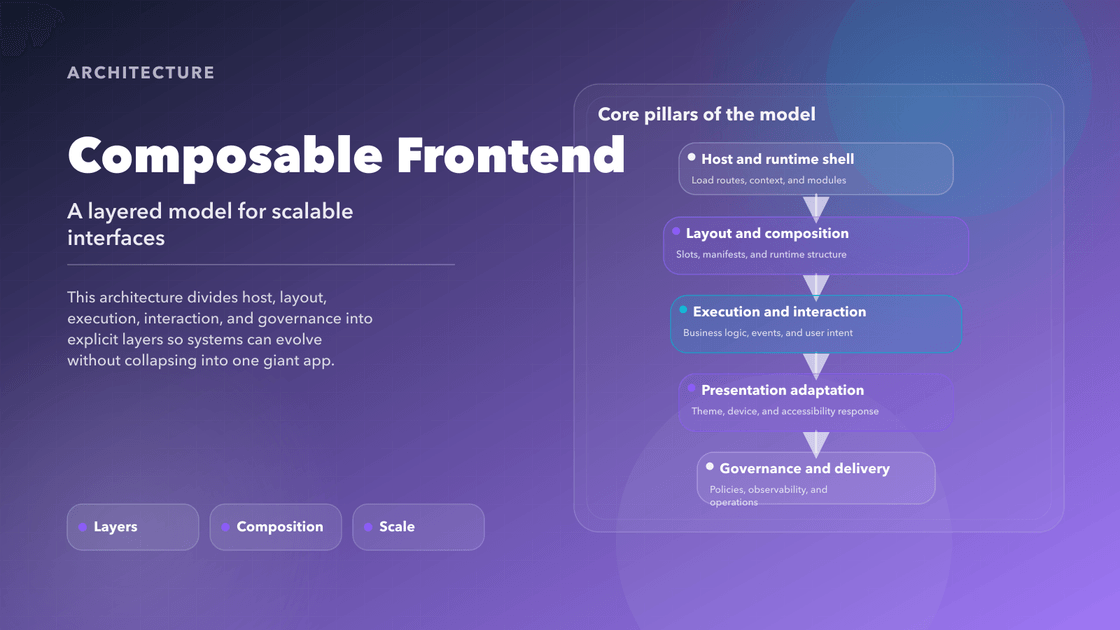
A layered frontend model for systems that need to survive growth.
Most frontend pain is not caused by React, Vue, or whatever rendering library happens to be popular this year. It comes from forcing too many responsibilities into the same place. Routing logic knows too much about layout. UI components own business rules. Accessibility becomes a patch. Device adaptation turns into a pile of exceptions. Teams step on each other because the system gives them nowhere clean to stand.
That is the problem this architecture is trying to solve.
Composable Frontend Architecture is a way of separating the frontend into explicit layers so each one can evolve without destabilizing the rest. It is not “micro frontends again” with new branding. The goal is not fragmentation. The goal is to create a system where runtime composition, business behavior, presentation, and interaction all have clear homes and stable contracts.
What Problem It Solves
Modern products rarely ship to one clean browser target anymore. The same capability may need to run in a desktop web app, a mobile shell, an embedded surface, a kiosk flow, or a server-rendered route. At the same time, different teams need to move independently without rewriting the same logic in slightly different ways.
In a conventional frontend, those pressures collapse into one codebase and one component tree. The result is familiar: duplicated flows, layout conditionals everywhere, fragile prop chains, and a growing sense that every new variation makes the whole product harder to reason about.
Composable architecture responds by treating the frontend as a set of cooperating systems rather than one undifferentiated application.
The Shape of the Architecture
The architecture works because each layer has a narrow job.
- Composable Execution Layer (CEL) owns business behavior, service access, and side effects.
- Dynamic Interface Mesh (DIM) decides how modules are placed, routed, and assembled into layouts.
- Adaptive Presentation Core (APC) adapts presentation to device, theme, accessibility, and context.
- Universal Interaction Framework (UIF), Modular Interaction Layer (MIL), and Event-Driven Component Network (EDCN) turn input, feedback, and module communication into reusable interaction infrastructure.
- Cross-Surface Execution Engine (CSEE) decides where logic should run across browser, server, edge, or constrained environments.
What matters is not memorizing the names. What matters is the separation. Layout should not secretly own business policy. Presentation should not decide where stateful logic runs. Interaction should not be hardwired to a single surface.
How a Request Moves Through the System
Imagine a user opens a product details page.
The runtime shell resolves the route and loads the modules the page needs. DIM decides which layout shell applies and where each module should land. CEL handles the data requirements and business actions for those modules. APC shapes how the resulting UI should feel on this device, in this theme, with these accessibility preferences. UIF and MIL translate clicks, taps, keyboard shortcuts, or assistive interaction into shared commands. If some logic should run at the edge or on the server instead of in the browser, CSEE makes that execution decision without forcing the whole feature to be rewritten.
That sequence sounds obvious when written out. The reason it matters is that most frontend systems blur those steps together until they become impossible to change independently.
Why This Structure Works
The immediate benefit is not theoretical elegance. It is operational clarity.
Teams can work in parallel because they are no longer competing inside the same layer. A layout team can change how a page is assembled without touching the core business workflow. A platform team can improve interaction primitives without rewriting product flows. A design systems team can make accessibility or token changes without asking every feature team to reinterpret the same rule.
The second benefit is portability. Once behavior and interaction are expressed as contracts instead of widget-specific code, the same capability can move across surfaces much more cleanly. You stop rebuilding “the same checkout, but for this one shell” over and over.
The third benefit is resilience. Failures become easier to isolate because the architecture gives you better boundaries for ownership, observability, and rollback.
Where It Pays Off
This model is strongest when a product family shares capabilities across multiple surfaces, when the organization has more than one team shipping into the same frontend, or when the cost of duplication is already visible in release friction and inconsistent behavior.
A checkout flow is a good example. In a layered system, pricing rules and eligibility live in execution contracts, the page structure lives in composition, and the mobile or kiosk-specific presentation lives in adaptation. That is a more durable arrangement than cloning three separate checkouts and hoping they stay aligned.
It also pays off in internal platforms. Admin tools, support dashboards, embedded partner portals, and white-label products tend to accumulate variants quickly. Composable boundaries make those variants cheaper to support because not every change requires a new application shape.
Where It Can Fail
This architecture is not free.
If the team is small, the product is simple, or the runtime targets are narrow, a full layered model can be too much ceremony. It also fails when the naming gets more attention than the contracts. A system full of elegant layer names but weak ownership rules will still collapse into confusion.
The benchmark is practical: each layer should remove duplication, reduce coupling, or improve change safety. If it does not, it is abstraction for its own sake.
Reading Path
If you want to go deeper, read the architecture in this order:
- Composable Execution Layer (CEL)
- Dynamic Interface Mesh (DIM)
- Adaptive Presentation Core (APC)
- Event-Driven Component Network (EDCN)
- Universal Interaction Framework (UIF)
- Cross-Surface Execution Engine (CSEE)
- Modular Interaction Layer (MIL)
The value of the model is not any single layer in isolation. It comes from giving the frontend enough architectural shape that growth stops feeling like entropy.