MCP From First Principles

- Published on
MCP From First Principles
Part of the Agent Engineering Playbook.
The Model Context Protocol became popular fast enough that a lot of people skipped the part where they understood what it actually is. They know it is somehow related to tools. They know Claude Code can use it. They know every AI product on earth now claims to support it. But when it is time to design or debug an MCP integration, the mental model is often missing.
So start here: MCP is not "magic agent connectivity." It is a protocol for separating an AI host from the systems that can provide context or actions.
The Shape of the Protocol
The official MCP specification describes a host-client-server architecture.
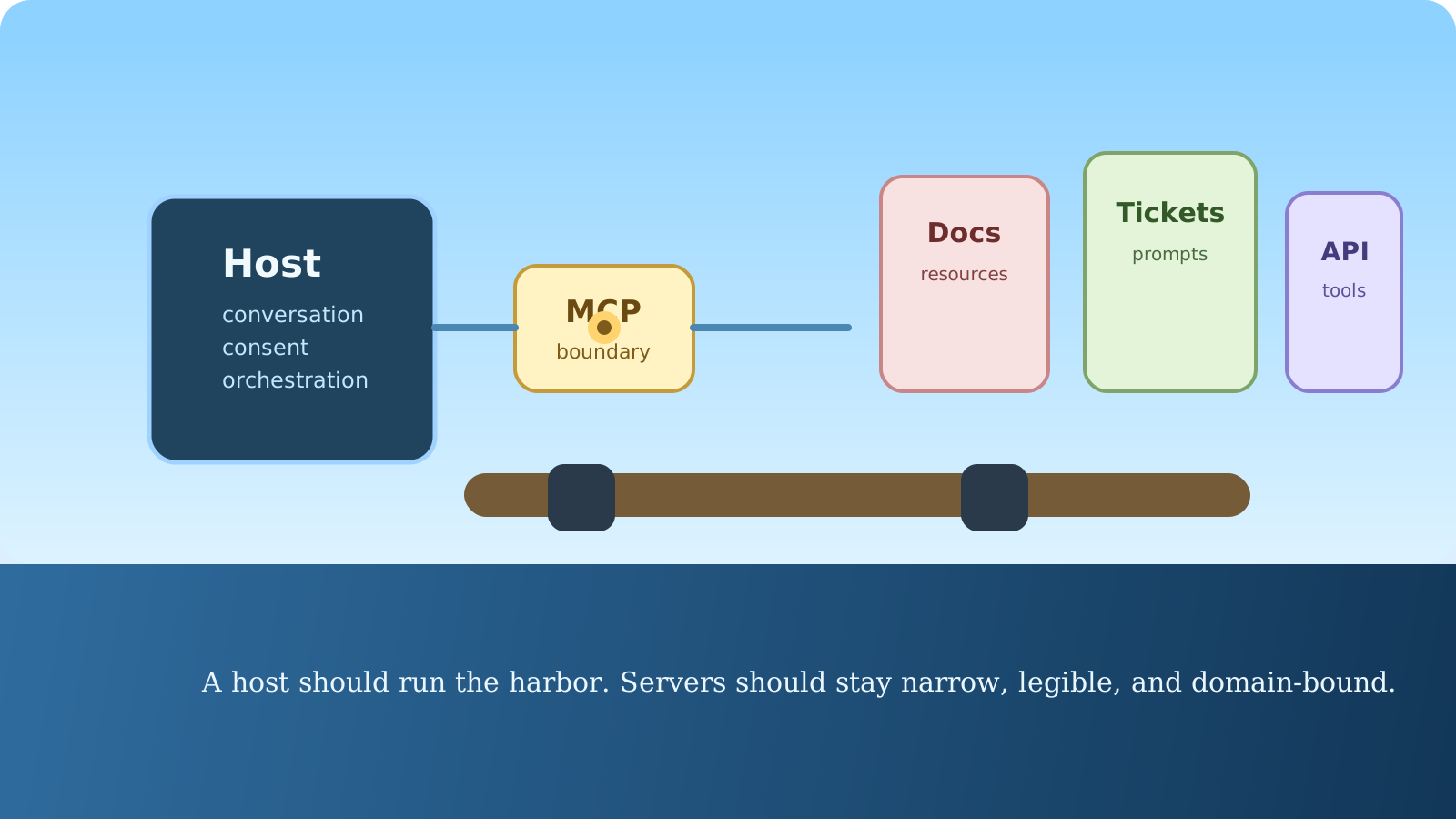
The host is the LLM application. In this series, that is often Claude Code. The client is the connector inside the host that maintains a session with one MCP server. The server is the thing exposing useful capabilities. The spec also makes a second point that matters just as much: servers expose three main primitives, namely resources, prompts, and tools.
That gives you a stable frame:
- resources are context and data
- prompts are reusable prompt templates or workflows exposed by the server
- tools are callable actions the model can execute
The spec is intentionally conservative about security boundaries. Hosts own consent, authorization, and the conversation. Servers do not get to see everything by default, and they should not. That is one of the reasons MCP is more interesting than the old plugin conversations. It gives you composability without pretending trust is free.
Why Claude Code Uses MCP Well
Anthropic's MCP docs describe Claude Code as a host that can connect to hundreds of external tools and data sources through MCP servers. That is the practical value. Claude already knows how to edit code and run terminal commands in the repo. MCP is what lets it reach the systems outside that boundary without hard-coding one-off integrations into the model loop itself.
That means your agent can move beyond local code questions:
- read a design document before implementing a UI change
- inspect an issue tracker ticket before planning work
- query monitoring data while debugging a release regression
- pull structured information from an internal knowledge base
The point is not novelty. The point is closing the context gap between the repository and the rest of the engineering system.
The Most Common Mistake: Treating MCP Like a Plugin Catalog
This is the wrong starting question: "What MCP servers should I install?"
The right question is: "What information or actions does my agent actually need that it cannot safely get from the repo and shell?"
If you answer that clearly, MCP design becomes much simpler.
Suppose your team ships off Jira tickets, Figma designs, and internal API docs. That does not automatically mean you need three MCP servers on day one. It means you should trace the actual workflow. If the agent repeatedly fails because it cannot read a ticket or cannot inspect design decisions, that is a real integration need. If you are wiring in half the company because it feels modern, you are just increasing the blast radius.
What a Good MCP Boundary Looks Like
The MCP architecture page highlights a design principle that is easy to miss: servers should be easy to build and highly composable, while the host handles orchestration and user control.
That should shape the way you design servers.
A good server has a narrow job. It knows how to expose a resource tree, a few prompts, or a clean set of tools around one domain. It does not try to become a second application runtime. It does not need to know the full conversation. It does not need to coordinate every other server. It just needs to be reliable inside its boundary.
That is especially important for internal platforms. Teams are often tempted to build "the company MCP server" that wraps docs, tickets, deployments, secrets, dashboards, and miscellaneous internal APIs behind one giant interface. That usually ages badly. Narrow servers are easier to reason about, audit, and permission.
The Claude Code Workflow
Anthropic gives Claude Code both CLI and REPL-level ways to manage MCP. You can inspect configured servers with commands like claude mcp list, inspect a server with claude mcp get, remove one with claude mcp remove, or work interactively through /mcp.
The docs also distinguish scopes:
localfor personal, project-specific setupprojectfor shared configuration checked into.mcp.jsonuserfor your cross-project utilities
That is more important than it looks. A lot of MCP pain is really configuration pain. If a server is experimental or credential-heavy, keep it local. If it is part of the team workflow, move it to project scope. If it is your own personal helper across many repos, keep it user-scoped.
This simple configuration pattern is worth knowing:
{
  "mcpServers": {
    "api-server": {
      "type": "sse",
      "url": "${API_BASE_URL:-https://api.example.com}/mcp",
      "headers": {
        "Authorization": "Bearer ${API_KEY}"
      }
    }
  }
}
Anthropic explicitly supports environment variable expansion in .mcp.json, which is exactly the sort of small feature that makes a shared configuration practical in real teams.
How I Decide Between a Skill and an MCP Server
This distinction saves a lot of wasted engineering.
Use a skill when the agent already has the data it needs and what you want is better reasoning, structure, or workflow. Use MCP when the agent is missing capabilities or outside context. A skill tells Claude how to work. An MCP server gives Claude somewhere new to work.
Sometimes they combine well. A skill can call MCP-backed tools, or a server can expose prompts that become natural entry points inside the UI. But they solve different problems.
Where to Be Strict
The MCP spec is unusually clear about trust and safety. Users must control what data is shared and what actions are taken. Tools should be treated as potentially dangerous. Sampling requests need explicit approval. The host should preserve the boundary between servers.
That matters because MCP makes agents more useful by making them more connected. Useful and dangerous tend to arrive together.
So be strict about three things:
First, keep servers narrow. Second, make permissions legible. Third, log enough that you can reconstruct what the agent actually touched. If you do not do those three things, you will eventually end up with a system that is technically impressive and operationally untrustworthy.
If you now have enough external context and still feel bottlenecked, the next pressure point is usually decomposition. That is where When to Use Subagents, and When Not To becomes relevant.