Universal Interaction Framework (UIF)
- Published on
Part of Building Composable Systems. For the full frontend reading path, start with Part II: Composable Frontend Architecture.
A button works with a mouse. Someone adds an Enter-key handler to make it accessible. Now pressing Enter submits the form twice: once through the new handler and once through the button's existing activation behavior.
The attempt to support another input method introduced a second path to the same action.
This is the problem I want an interaction abstraction to solve. The application should understand what the user intends, while the platform handles as much of the input behavior as it already knows how to handle.
The Universal Interaction Framework (UIF) names that boundary in this architecture. It connects supported input methods to meaningful actions without making every component reinterpret clicks, keys, gestures, and focus for itself.
Why We Need UIF
As users engage with applications across devices—phones, tablets, laptops, smart TVs, kiosks, VR headsets—the variety of input mechanisms and interaction expectations grows. A single button might be clicked, tapped, keyboard-navigated, voiced, or gesture-activated depending on the device.
Traditionally, frontend developers handle these edge cases by layering specific event handlers (e.g., onClick, onKeyDown, onTouchStart) onto components. But this quickly leads to:
- Redundant and tangled input logic.
- Fragile accessibility behavior.
- Unclear or inconsistent user expectations.
UIF was created to solve this.
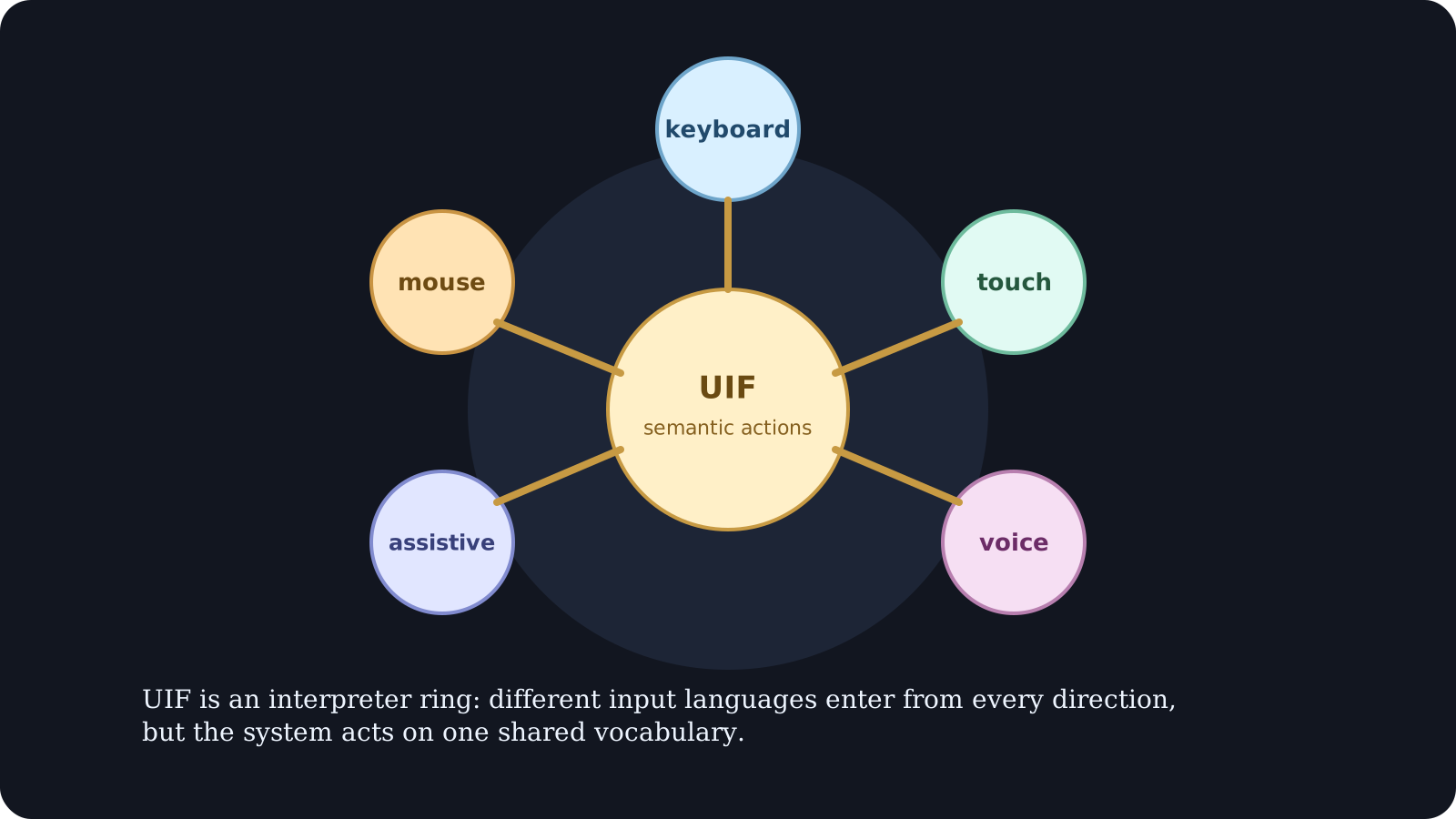
UIF defines a layer of abstract interaction primitives—like "Activate", "Navigate", "FocusNext", or "Select"—that map to real-world user interactions depending on context. These primitives then emit standard events to connected components or systems like ECN or APC.
With UIF, developers can:
- Write interaction logic once and apply it across platforms.
- Decouple focus management and keyboard navigation from rendering.
- Support touch, keyboard, mouse, voice, and assistive tech with the same code.
- Design interaction-first, then render based on need.
Architecture Overview
To support advanced use cases such as eye tracking, progressive enhancement, and multimodal input orchestration, UIF integrates with other layers like ECN and CSEE. Below is the updated model.
%3b%7d%23mermaid-0 .error-text%7bfill:rgb(0%2c 0%2c 0)%3bstroke:rgb(0%2c 0%2c 0)%3b%7d%23mermaid-0 .edge-thickness-normal%7bstroke-width:1px%3b%7d%23mermaid-0 .edge-thickness-thick%7bstroke-width:3.5px%3b%7d%23mermaid-0 .edge-pattern-solid%7bstroke-dasharray:0%3b%7d%23mermaid-0 .edge-thickness-invisible%7bstroke-width:0%3bfill:none%3b%7d%23mermaid-0 .edge-pattern-dashed%7bstroke-dasharray:3%3b%7d%23mermaid-0 .edge-pattern-dotted%7bstroke-dasharray:2%3b%7d%23mermaid-0 .marker%7bfill:%23666666%3bstroke:%23666666%3b%7d%23mermaid-0 .marker.cross%7bstroke:%23666666%3b%7d%23mermaid-0 svg%7bfont-family:system-ui%2c-apple-system%2csans-serif%3bfont-size:16px%3b%7d%23mermaid-0 p%7bmargin:0%3b%7d%23mermaid-0 .label%7bfont-family:system-ui%2c-apple-system%2csans-serif%3bcolor:black%3b%7d%23mermaid-0 .cluster-label text%7bfill:rgb(0%2c 0%2c 0)%3b%7d%23mermaid-0 .cluster-label span%7bcolor:rgb(0%2c 0%2c 0)%3b%7d%23mermaid-0 .cluster-label span p%7bbackground-color:transparent%3b%7d%23mermaid-0 .label text%2c%23mermaid-0 span%7bfill:black%3bcolor:black%3b%7d%23mermaid-0 .node rect%2c%23mermaid-0 .node circle%2c%23mermaid-0 .node ellipse%2c%23mermaid-0 .node polygon%2c%23mermaid-0 .node path%7bfill:white%3bstroke:%23cccccc%3bstroke-width:1px%3b%7d%23mermaid-0 .rough-node .label text%2c%23mermaid-0 .node .label text%2c%23mermaid-0 .image-shape .label%2c%23mermaid-0 .icon-shape .label%7btext-anchor:middle%3b%7d%23mermaid-0 .node .katex path%7bfill:black%3bstroke:black%3bstroke-width:1px%3b%7d%23mermaid-0 .rough-node .label%2c%23mermaid-0 .node .label%2c%23mermaid-0 .image-shape .label%2c%23mermaid-0 .icon-shape .label%7btext-align:center%3b%7d%23mermaid-0 .node.clickable%7bcursor:pointer%3b%7d%23mermaid-0 .root .anchor path%7bfill:%23666666!important%3bstroke-width:0%3bstroke:%23666666%3b%7d%23mermaid-0 .arrowheadPath%7bfill:%230b0b0b%3b%7d%23mermaid-0 .edgePath .path%7bstroke:%23666666%3bstroke-width:2.0px%3b%7d%23mermaid-0 .flowchart-link%7bstroke:%23666666%3bfill:none%3b%7d%23mermaid-0 .edgeLabel%7bbackground-color:hsl(-120%2c 0%25%2c 100%25)%3btext-align:center%3b%7d%23mermaid-0 .edgeLabel p%7bbackground-color:hsl(-120%2c 0%25%2c 100%25)%3b%7d%23mermaid-0 .edgeLabel rect%7bopacity:0.5%3bbackground-color:hsl(-120%2c 0%25%2c 100%25)%3bfill:hsl(-120%2c 0%25%2c 100%25)%3b%7d%23mermaid-0 .labelBkg%7bbackground-color:rgba(255%2c 255%2c 255%2c 0.5)%3b%7d%23mermaid-0 .cluster rect%7bfill:white%3bstroke:hsl(180%2c 0%25%2c 90%25)%3bstroke-width:1px%3b%7d%23mermaid-0 .cluster text%7bfill:rgb(0%2c 0%2c 0)%3b%7d%23mermaid-0 .cluster span%7bcolor:rgb(0%2c 0%2c 0)%3b%7d%23mermaid-0 div.mermaidTooltip%7bposition:absolute%3btext-align:center%3bmax-width:200px%3bpadding:2px%3bfont-family:system-ui%2c-apple-system%2csans-serif%3bfont-size:12px%3bbackground:hsl(180%2c 0%25%2c 100%25)%3bborder:1px solid hsl(180%2c 0%25%2c 90%25)%3bborder-radius:2px%3bpointer-events:none%3bz-index:100%3b%7d%23mermaid-0 .flowchartTitleText%7btext-anchor:middle%3bfont-size:18px%3bfill:black%3b%7d%23mermaid-0 rect.text%7bfill:none%3bstroke-width:0%3b%7d%23mermaid-0 .icon-shape%2c%23mermaid-0 .image-shape%7bbackground-color:hsl(-120%2c 0%25%2c 100%25)%3btext-align:center%3b%7d%23mermaid-0 .icon-shape p%2c%23mermaid-0 .image-shape p%7bbackground-color:hsl(-120%2c 0%25%2c 100%25)%3bpadding:2px%3b%7d%23mermaid-0 .icon-shape rect%2c%23mermaid-0 .image-shape rect%7bopacity:0.5%3bbackground-color:hsl(-120%2c 0%25%2c 100%25)%3bfill:hsl(-120%2c 0%25%2c 100%25)%3b%7d%23mermaid-0 .label-icon%7bdisplay:inline-block%3bheight:1em%3boverflow:visible%3bvertical-align:-0.125em%3b%7d%23mermaid-0 .node .label-icon path%7bfill:currentColor%3bstroke:revert%3bstroke-width:revert%3b%7d%23mermaid-0 :root%7b--mermaid-font-family:system-ui%2c-apple-system%2csans-serif%3b%7d%3c/style%3e%3cg%3e%3cmarker id='mermaid-0_flowchart-v2-pointEnd' class='marker flowchart-v2' viewBox='0 0 10 10' refX='5' refY='5' markerUnits='userSpaceOnUse' markerWidth='8' markerHeight='8' orient='auto'%3e%3cpath d='M 0 0 L 10 5 L 0 10 z' class='arrowMarkerPath' style='stroke-width: 1%3b stroke-dasharray: 1%2c 0%3b'/%3e%3c/marker%3e%3cmarker id='mermaid-0_flowchart-v2-pointStart' class='marker flowchart-v2' viewBox='0 0 10 10' refX='4.5' refY='5' markerUnits='userSpaceOnUse' markerWidth='8' markerHeight='8' orient='auto'%3e%3cpath d='M 0 5 L 10 10 L 10 0 z' class='arrowMarkerPath' style='stroke-width: 1%3b stroke-dasharray: 1%2c 0%3b'/%3e%3c/marker%3e%3cmarker id='mermaid-0_flowchart-v2-circleEnd' class='marker flowchart-v2' viewBox='0 0 10 10' refX='11' refY='5' markerUnits='userSpaceOnUse' markerWidth='11' markerHeight='11' orient='auto'%3e%3ccircle cx='5' cy='5' r='5' class='arrowMarkerPath' style='stroke-width: 1%3b stroke-dasharray: 1%2c 0%3b'/%3e%3c/marker%3e%3cmarker id='mermaid-0_flowchart-v2-circleStart' class='marker flowchart-v2' viewBox='0 0 10 10' refX='-1' refY='5' markerUnits='userSpaceOnUse' markerWidth='11' markerHeight='11' orient='auto'%3e%3ccircle cx='5' cy='5' r='5' class='arrowMarkerPath' style='stroke-width: 1%3b stroke-dasharray: 1%2c 0%3b'/%3e%3c/marker%3e%3cmarker id='mermaid-0_flowchart-v2-crossEnd' class='marker cross flowchart-v2' viewBox='0 0 11 11' refX='12' refY='5.2' markerUnits='userSpaceOnUse' markerWidth='11' markerHeight='11' orient='auto'%3e%3cpath d='M 1%2c1 l 9%2c9 M 10%2c1 l -9%2c9' class='arrowMarkerPath' style='stroke-width: 2%3b stroke-dasharray: 1%2c 0%3b'/%3e%3c/marker%3e%3cmarker id='mermaid-0_flowchart-v2-crossStart' class='marker cross flowchart-v2' viewBox='0 0 11 11' refX='-1' refY='5.2' markerUnits='userSpaceOnUse' markerWidth='11' markerHeight='11' orient='auto'%3e%3cpath d='M 1%2c1 l 9%2c9 M 10%2c1 l -9%2c9' class='arrowMarkerPath' style='stroke-width: 2%3b stroke-dasharray: 1%2c 0%3b'/%3e%3c/marker%3e%3cg class='root'%3e%3cg class='clusters'/%3e%3cg class='edgePaths'%3e%3cpath d='M130.641%2c92L130.641%2c102C130.641%2c112%2c130.641%2c132%2c240.709%2c158.078C350.778%2c184.156%2c570.916%2c216.312%2c680.985%2c232.39L791.054%2c248.468' id='L_A_B_0' class=' edge-thickness-normal edge-pattern-solid edge-thickness-normal edge-pattern-solid flowchart-link' style='%3b' data-edge='true' data-et='edge' data-id='L_A_B_0' data-points='W3sieCI6MTMwLjY0MDYyNSwieSI6OTJ9LHsieCI6MTMwLjY0MDYyNSwieSI6MTUyfSx7IngiOjc5NS4wMTE3MTg3NSwieSI6MjQ5LjA0NjQ0MzUzMzQ5MjV9XQ==' marker-end='url(%23mermaid-0_flowchart-v2-pointEnd)'/%3e%3cpath d='M468.984%2c92L468.984%2c102C468.984%2c112%2c468.984%2c132%2c522.677%2c155.845C576.369%2c179.691%2c683.754%2c207.382%2c737.446%2c221.227L791.138%2c235.073' id='L_A1_B_0' class=' edge-thickness-normal edge-pattern-solid edge-thickness-normal edge-pattern-solid flowchart-link' style='%3b' data-edge='true' data-et='edge' data-id='L_A1_B_0' data-points='W3sieCI6NDY4Ljk4NDM3NSwieSI6OTJ9LHsieCI6NDY4Ljk4NDM3NSwieSI6MTUyfSx7IngiOjc5NS4wMTE3MTg3NSwieSI6MjM2LjA3MTQxMTUzMDgxNTF9XQ==' marker-end='url(%23mermaid-0_flowchart-v2-pointEnd)'/%3e%3cpath d='M767.148%2c92L767.148%2c102C767.148%2c112%2c767.148%2c132%2c779.251%2c151.586C791.353%2c171.172%2c815.558%2c190.344%2c827.661%2c199.93L839.763%2c209.516' id='L_A2_B_0' class=' edge-thickness-normal edge-pattern-solid edge-thickness-normal edge-pattern-solid flowchart-link' style='%3b' data-edge='true' data-et='edge' data-id='L_A2_B_0' data-points='W3sieCI6NzY3LjE0ODQzNzUsInkiOjkyfSx7IngiOjc2Ny4xNDg0Mzc1LCJ5IjoxNTJ9LHsieCI6ODQyLjg5ODg0ODY4NDIxMDUsInkiOjIxMn1d' marker-end='url(%23mermaid-0_flowchart-v2-pointEnd)'/%3e%3cpath d='M1055%2c92L1055%2c102C1055%2c112%2c1055%2c132%2c1042.898%2c151.586C1030.795%2c171.172%2c1006.59%2c190.344%2c994.488%2c199.93L982.385%2c209.516' id='L_A3_B_0' class=' edge-thickness-normal edge-pattern-solid edge-thickness-normal edge-pattern-solid flowchart-link' style='%3b' data-edge='true' data-et='edge' data-id='L_A3_B_0' data-points='W3sieCI6MTA1NSwieSI6OTJ9LHsieCI6MTA1NSwieSI6MTUyfSx7IngiOjk3OS4yNDk1ODg4MTU3ODk1LCJ5IjoyMTJ9XQ==' marker-end='url(%23mermaid-0_flowchart-v2-pointEnd)'/%3e%3cpath d='M1340.289%2c92L1340.289%2c102C1340.289%2c112%2c1340.289%2c132%2c1288.741%2c155.691C1237.194%2c179.382%2c1134.098%2c206.765%2c1082.55%2c220.456L1031.003%2c234.147' id='L_A4_B_0' class=' edge-thickness-normal edge-pattern-solid edge-thickness-normal edge-pattern-solid flowchart-link' style='%3b' data-edge='true' data-et='edge' data-id='L_A4_B_0' data-points='W3sieCI6MTM0MC4yODkwNjI1LCJ5Ijo5Mn0seyJ4IjoxMzQwLjI4OTA2MjUsInkiOjE1Mn0seyJ4IjoxMDI3LjEzNjcxODc1LCJ5IjoyMzUuMTczNjU0NjU2NDg1Nzh9XQ==' marker-end='url(%23mermaid-0_flowchart-v2-pointEnd)'/%3e%3cpath d='M1651.656%2c92L1651.656%2c102C1651.656%2c112%2c1651.656%2c132%2c1548.229%2c157.921C1444.801%2c183.842%2c1237.946%2c215.684%2c1134.518%2c231.605L1031.09%2c247.526' id='L_A5_B_0' class=' edge-thickness-normal edge-pattern-solid edge-thickness-normal edge-pattern-solid flowchart-link' style='%3b' data-edge='true' data-et='edge' data-id='L_A5_B_0' data-points='W3sieCI6MTY1MS42NTYyNSwieSI6OTJ9LHsieCI6MTY1MS42NTYyNSwieSI6MTUyfSx7IngiOjEwMjcuMTM2NzE4NzUsInkiOjI0OC4xMzQxNTMzNTI3Nzg5fV0=' marker-end='url(%23mermaid-0_flowchart-v2-pointEnd)'/%3e%3cpath d='M795.012%2c305.287L758.225%2c317.739C721.439%2c330.191%2c647.866%2c355.096%2c611.079%2c376.881C574.293%2c398.667%2c574.293%2c417.333%2c574.293%2c426.667L574.293%2c436' id='L_B_C_0' class=' edge-thickness-normal edge-pattern-solid edge-thickness-normal edge-pattern-solid flowchart-link' style='%3b' data-edge='true' data-et='edge' data-id='L_B_C_0' data-points='W3sieCI6Nzk1LjAxMTcxODc1LCJ5IjozMDUuMjg3MDAwMDkyNzkwMn0seyJ4Ijo1NzQuMjkyOTY4NzUsInkiOjM4MH0seyJ4Ijo1NzQuMjkyOTY4NzUsInkiOjQ0MH1d' marker-end='url(%23mermaid-0_flowchart-v2-pointEnd)'/%3e%3cpath d='M914.175%2c320L914.75%2c330C915.324%2c340%2c916.473%2c360%2c917.047%2c379.333C917.621%2c398.667%2c917.621%2c417.333%2c917.621%2c426.667L917.621%2c436' id='L_B_D_0' class=' edge-thickness-normal edge-pattern-solid edge-thickness-normal edge-pattern-solid flowchart-link' style='%3b' data-edge='true' data-et='edge' data-id='L_B_D_0' data-points='W3sieCI6OTE0LjE3NTM3MDA2NTc4OTUsInkiOjMyMH0seyJ4Ijo5MTcuNjIxMDkzNzUsInkiOjM4MH0seyJ4Ijo5MTcuNjIxMDkzNzUsInkiOjQ0MH1d' marker-end='url(%23mermaid-0_flowchart-v2-pointEnd)'/%3e%3cpath d='M1027.137%2c305.287L1063.923%2c317.739C1100.71%2c330.191%2c1174.283%2c355.096%2c1211.069%2c376.881C1247.855%2c398.667%2c1247.855%2c417.333%2c1247.855%2c426.667L1247.855%2c436' id='L_B_E_0' class=' edge-thickness-normal edge-pattern-solid edge-thickness-normal edge-pattern-solid flowchart-link' style='%3b' data-edge='true' data-et='edge' data-id='L_B_E_0' data-points='W3sieCI6MTAyNy4xMzY3MTg3NSwieSI6MzA1LjI4NzAwMDA5Mjc5MDJ9LHsieCI6MTI0Ny44NTU0Njg3NSwieSI6MzgwfSx7IngiOjEyNDcuODU1NDY4NzUsInkiOjQ0MH1d' marker-end='url(%23mermaid-0_flowchart-v2-pointEnd)'/%3e%3cpath d='M574.293%2c548L574.293%2c558C574.293%2c568%2c574.293%2c588%2c574.293%2c609.333C574.293%2c630.667%2c574.293%2c653.333%2c574.293%2c664.667L574.293%2c676' id='L_C_F_0' class=' edge-thickness-normal edge-pattern-solid edge-thickness-normal edge-pattern-solid flowchart-link' style='%3b' data-edge='true' data-et='edge' data-id='L_C_F_0' data-points='W3sieCI6NTc0LjI5Mjk2ODc1LCJ5Ijo1NDh9LHsieCI6NTc0LjI5Mjk2ODc1LCJ5Ijo2MDh9LHsieCI6NTc0LjI5Mjk2ODc1LCJ5Ijo2ODB9XQ==' marker-end='url(%23mermaid-0_flowchart-v2-pointEnd)'/%3e%3cpath d='M917.621%2c548L917.621%2c558C917.621%2c568%2c917.621%2c588%2c917.621%2c609.333C917.621%2c630.667%2c917.621%2c653.333%2c917.621%2c664.667L917.621%2c676' id='L_D_G_0' class=' edge-thickness-normal edge-pattern-solid edge-thickness-normal edge-pattern-solid flowchart-link' style='%3b' data-edge='true' data-et='edge' data-id='L_D_G_0' data-points='W3sieCI6OTE3LjYyMTA5Mzc1LCJ5Ijo1NDh9LHsieCI6OTE3LjYyMTA5Mzc1LCJ5Ijo2MDh9LHsieCI6OTE3LjYyMTA5Mzc1LCJ5Ijo2ODB9XQ==' marker-end='url(%23mermaid-0_flowchart-v2-pointEnd)'/%3e%3cpath d='M1247.855%2c548L1247.855%2c558C1247.855%2c568%2c1247.855%2c588%2c1247.855%2c607.333C1247.855%2c626.667%2c1247.855%2c645.333%2c1247.855%2c654.667L1247.855%2c664' id='L_E_H_0' class=' edge-thickness-normal edge-pattern-solid edge-thickness-normal edge-pattern-solid flowchart-link' style='%3b' data-edge='true' data-et='edge' data-id='L_E_H_0' data-points='W3sieCI6MTI0Ny44NTU0Njg3NSwieSI6NTQ4fSx7IngiOjEyNDcuODU1NDY4NzUsInkiOjYwOH0seyJ4IjoxMjQ3Ljg1NTQ2ODc1LCJ5Ijo2Njh9XQ==' marker-end='url(%23mermaid-0_flowchart-v2-pointEnd)'/%3e%3c/g%3e%3cg class='edgeLabels'%3e%3cg%3e%3crect class='background' style='stroke: none'/%3e%3c/g%3e%3cg%3e%3crect class='background' style='stroke: none'/%3e%3c/g%3e%3cg%3e%3crect class='background' style='stroke: none'/%3e%3c/g%3e%3cg%3e%3crect class='background' style='stroke: none'/%3e%3c/g%3e%3cg%3e%3crect class='background' style='stroke: none'/%3e%3c/g%3e%3cg%3e%3crect class='background' style='stroke: none'/%3e%3c/g%3e%3cg%3e%3crect class='background' style='stroke: none'/%3e%3c/g%3e%3cg%3e%3crect class='background' style='stroke: none'/%3e%3c/g%3e%3cg%3e%3crect class='background' style='stroke: none'/%3e%3c/g%3e%3cg%3e%3crect class='background' style='stroke: none'/%3e%3c/g%3e%3cg%3e%3crect class='background' style='stroke: none'/%3e%3c/g%3e%3cg%3e%3crect class='background' style='stroke: none'/%3e%3c/g%3e%3cg class='edgeLabel'%3e%3cg class='label' data-id='L_A_B_0' transform='translate(0%2c 0)'%3e%3ctext y='-10.1'%3e%3ctspan class='text-outer-tspan' x='0' y='-0.1em' dy='1.1em'/%3e%3c/text%3e%3c/g%3e%3c/g%3e%3cg class='edgeLabel'%3e%3cg class='label' data-id='L_A1_B_0' transform='translate(0%2c 0)'%3e%3ctext y='-10.1'%3e%3ctspan class='text-outer-tspan' x='0' y='-0.1em' dy='1.1em'/%3e%3c/text%3e%3c/g%3e%3c/g%3e%3cg class='edgeLabel'%3e%3cg class='label' data-id='L_A2_B_0' transform='translate(0%2c 0)'%3e%3ctext y='-10.1'%3e%3ctspan class='text-outer-tspan' x='0' y='-0.1em' dy='1.1em'/%3e%3c/text%3e%3c/g%3e%3c/g%3e%3cg class='edgeLabel'%3e%3cg class='label' data-id='L_A3_B_0' transform='translate(0%2c 0)'%3e%3ctext y='-10.1'%3e%3ctspan class='text-outer-tspan' x='0' y='-0.1em' dy='1.1em'/%3e%3c/text%3e%3c/g%3e%3c/g%3e%3cg class='edgeLabel'%3e%3cg class='label' data-id='L_A4_B_0' transform='translate(0%2c 0)'%3e%3ctext y='-10.1'%3e%3ctspan class='text-outer-tspan' x='0' y='-0.1em' dy='1.1em'/%3e%3c/text%3e%3c/g%3e%3c/g%3e%3cg class='edgeLabel'%3e%3cg class='label' data-id='L_A5_B_0' transform='translate(0%2c 0)'%3e%3ctext y='-10.1'%3e%3ctspan class='text-outer-tspan' x='0' y='-0.1em' dy='1.1em'/%3e%3c/text%3e%3c/g%3e%3c/g%3e%3cg class='edgeLabel'%3e%3cg class='label' data-id='L_B_C_0' transform='translate(0%2c 0)'%3e%3ctext y='-10.1'%3e%3ctspan class='text-outer-tspan' x='0' y='-0.1em' dy='1.1em'/%3e%3c/text%3e%3c/g%3e%3c/g%3e%3cg class='edgeLabel'%3e%3cg class='label' data-id='L_B_D_0' transform='translate(0%2c 0)'%3e%3ctext y='-10.1'%3e%3ctspan class='text-outer-tspan' x='0' y='-0.1em' dy='1.1em'/%3e%3c/text%3e%3c/g%3e%3c/g%3e%3cg class='edgeLabel'%3e%3cg class='label' data-id='L_B_E_0' transform='translate(0%2c 0)'%3e%3ctext y='-10.1'%3e%3ctspan class='text-outer-tspan' x='0' y='-0.1em' dy='1.1em'/%3e%3c/text%3e%3c/g%3e%3c/g%3e%3cg class='edgeLabel'%3e%3cg class='label' data-id='L_C_F_0' transform='translate(0%2c 0)'%3e%3ctext y='-10.1'%3e%3ctspan class='text-outer-tspan' x='0' y='-0.1em' dy='1.1em'/%3e%3c/text%3e%3c/g%3e%3c/g%3e%3cg class='edgeLabel'%3e%3cg class='label' data-id='L_D_G_0' transform='translate(0%2c 0)'%3e%3ctext y='-10.1'%3e%3ctspan class='text-outer-tspan' x='0' y='-0.1em' dy='1.1em'/%3e%3c/text%3e%3c/g%3e%3c/g%3e%3cg class='edgeLabel'%3e%3cg class='label' data-id='L_E_H_0' transform='translate(0%2c 0)'%3e%3ctext y='-10.1'%3e%3ctspan class='text-outer-tspan' x='0' y='-0.1em' dy='1.1em'/%3e%3c/text%3e%3c/g%3e%3c/g%3e%3c/g%3e%3cg class='nodes'%3e%3cg class='node default ' id='flowchart-A-0' transform='translate(130.640625%2c 50)'%3e%3crect class='basic label-container' style='fill:%23ffebee !important' x='-122.640625' y='-42' width='245.28125' height='84'/%3e%3cg class='label' style='' transform='translate(-62.640625%2c -12)'%3e%3crect/%3e%3cforeignObject width='125.28125' height='24'%3e%3cdiv xmlns='http://www.w3.org/1999/xhtml' style='display: table-cell%3b white-space: nowrap%3b line-height: 1.5%3b max-width: 300px%3b text-align: center%3b'%3e%3cspan class='nodeLabel '%3e%3cp%3eUser Input Layer%3c/p%3e%3c/span%3e%3c/div%3e%3c/foreignObject%3e%3c/g%3e%3c/g%3e%3cg class='node default ' id='flowchart-B-1' transform='translate(911.07421875%2c 266)'%3e%3crect class='basic label-container' style='fill:%23e3f2fd !important' x='-116.0625' y='-54' width='232.125' height='108'/%3e%3cg class='label' style='' transform='translate(-56.0625%2c -24)'%3e%3crect/%3e%3cforeignObject width='112.125' height='48'%3e%3cdiv xmlns='http://www.w3.org/1999/xhtml' style='display: table-cell%3b white-space: nowrap%3b line-height: 1.5%3b max-width: 300px%3b text-align: center%3b'%3e%3cspan class='nodeLabel '%3e%3cp%3eUIF Interaction%3cbr /%3eEngine%3c/p%3e%3c/span%3e%3c/div%3e%3c/foreignObject%3e%3c/g%3e%3c/g%3e%3cg class='node default ' id='flowchart-A1-2' transform='translate(468.984375%2c 50)'%3e%3crect class='basic label-container' style='' x='-95.703125' y='-42' width='191.40625' height='84'/%3e%3cg class='label' style='' transform='translate(-35.703125%2c -12)'%3e%3crect/%3e%3cforeignObject width='71.40625' height='24'%3e%3cdiv xmlns='http://www.w3.org/1999/xhtml' style='display: table-cell%3b white-space: nowrap%3b line-height: 1.5%3b max-width: 300px%3b text-align: center%3b'%3e%3cspan class='nodeLabel '%3e%3cp%3eKeyboard%3c/p%3e%3c/span%3e%3c/div%3e%3c/foreignObject%3e%3c/g%3e%3c/g%3e%3cg class='node default ' id='flowchart-A2-4' transform='translate(767.1484375%2c 50)'%3e%3crect class='basic label-container' style='' x='-82.4609375' y='-42' width='164.921875' height='84'/%3e%3cg class='label' style='' transform='translate(-22.4609375%2c -12)'%3e%3crect/%3e%3cforeignObject width='44.921875' height='24'%3e%3cdiv xmlns='http://www.w3.org/1999/xhtml' style='display: table-cell%3b white-space: nowrap%3b line-height: 1.5%3b max-width: 300px%3b text-align: center%3b'%3e%3cspan class='nodeLabel '%3e%3cp%3eTouch%3c/p%3e%3c/span%3e%3c/div%3e%3c/foreignObject%3e%3c/g%3e%3c/g%3e%3cg class='node default ' id='flowchart-A3-6' transform='translate(1055%2c 50)'%3e%3crect class='basic label-container' style='' x='-85.390625' y='-42' width='170.78125' height='84'/%3e%3cg class='label' style='' transform='translate(-25.390625%2c -12)'%3e%3crect/%3e%3cforeignObject width='50.78125' height='24'%3e%3cdiv xmlns='http://www.w3.org/1999/xhtml' style='display: table-cell%3b white-space: nowrap%3b line-height: 1.5%3b max-width: 300px%3b text-align: center%3b'%3e%3cspan class='nodeLabel '%3e%3cp%3eMouse%3c/p%3e%3c/span%3e%3c/div%3e%3c/foreignObject%3e%3c/g%3e%3c/g%3e%3cg class='node default ' id='flowchart-A4-8' transform='translate(1340.2890625%2c 50)'%3e%3crect class='basic label-container' style='' x='-79.8984375' y='-42' width='159.796875' height='84'/%3e%3cg class='label' style='' transform='translate(-19.8984375%2c -12)'%3e%3crect/%3e%3cforeignObject width='39.796875' height='24'%3e%3cdiv xmlns='http://www.w3.org/1999/xhtml' style='display: table-cell%3b white-space: nowrap%3b line-height: 1.5%3b max-width: 300px%3b text-align: center%3b'%3e%3cspan class='nodeLabel '%3e%3cp%3eVoice%3c/p%3e%3c/span%3e%3c/div%3e%3c/foreignObject%3e%3c/g%3e%3c/g%3e%3cg class='node default ' id='flowchart-A5-10' transform='translate(1651.65625%2c 50)'%3e%3crect class='basic label-container' style='' x='-111.46875' y='-42' width='222.9375' height='84'/%3e%3cg class='label' style='' transform='translate(-51.46875%2c -12)'%3e%3crect/%3e%3cforeignObject width='102.9375' height='24'%3e%3cdiv xmlns='http://www.w3.org/1999/xhtml' style='display: table-cell%3b white-space: nowrap%3b line-height: 1.5%3b max-width: 300px%3b text-align: center%3b'%3e%3cspan class='nodeLabel '%3e%3cp%3eAssistive Tech%3c/p%3e%3c/span%3e%3c/div%3e%3c/foreignObject%3e%3c/g%3e%3c/g%3e%3cg class='node default ' id='flowchart-C-13' transform='translate(574.29296875%2c 494)'%3e%3crect class='basic label-container' style='fill:%23e8f5e8 !important' x='-93.9140625' y='-54' width='187.828125' height='108'/%3e%3cg class='label' style='' transform='translate(-33.9140625%2c -24)'%3e%3crect/%3e%3cforeignObject width='67.828125' height='48'%3e%3cdiv xmlns='http://www.w3.org/1999/xhtml' style='display: table-cell%3b white-space: nowrap%3b line-height: 1.5%3b max-width: 300px%3b text-align: center%3b'%3e%3cspan class='nodeLabel '%3e%3cp%3eFocus%3cbr /%3eManager%3c/p%3e%3c/span%3e%3c/div%3e%3c/foreignObject%3e%3c/g%3e%3c/g%3e%3cg class='node default ' id='flowchart-D-15' transform='translate(917.62109375%2c 494)'%3e%3crect class='basic label-container' style='fill:%23e8f5e8 !important' x='-89.65625' y='-54' width='179.3125' height='108'/%3e%3cg class='label' style='' transform='translate(-29.65625%2c -24)'%3e%3crect/%3e%3cforeignObject width='59.3125' height='48'%3e%3cdiv xmlns='http://www.w3.org/1999/xhtml' style='display: table-cell%3b white-space: nowrap%3b line-height: 1.5%3b max-width: 300px%3b text-align: center%3b'%3e%3cspan class='nodeLabel '%3e%3cp%3eGesture%3cbr /%3eMapper%3c/p%3e%3c/span%3e%3c/div%3e%3c/foreignObject%3e%3c/g%3e%3c/g%3e%3cg class='node default ' id='flowchart-E-17' transform='translate(1247.85546875%2c 494)'%3e%3crect class='basic label-container' style='fill:%23e8f5e8 !important' x='-100.6328125' y='-54' width='201.265625' height='108'/%3e%3cg class='label' style='' transform='translate(-40.6328125%2c -24)'%3e%3crect/%3e%3cforeignObject width='81.265625' height='48'%3e%3cdiv xmlns='http://www.w3.org/1999/xhtml' style='display: table-cell%3b white-space: nowrap%3b line-height: 1.5%3b max-width: 300px%3b text-align: center%3b'%3e%3cspan class='nodeLabel '%3e%3cp%3eCommand%3cbr /%3eDispatcher%3c/p%3e%3c/span%3e%3c/div%3e%3c/foreignObject%3e%3c/g%3e%3c/g%3e%3cg class='node default ' id='flowchart-F-19' transform='translate(574.29296875%2c 722)'%3e%3crect class='basic label-container' style='fill:%23fff3e0 !important' x='-111.6171875' y='-42' width='223.234375' height='84'/%3e%3cg class='label' style='' transform='translate(-51.6171875%2c -12)'%3e%3crect/%3e%3cforeignObject width='103.234375' height='24'%3e%3cdiv xmlns='http://www.w3.org/1999/xhtml' style='display: table-cell%3b white-space: nowrap%3b line-height: 1.5%3b max-width: 300px%3b text-align: center%3b'%3e%3cspan class='nodeLabel '%3e%3cp%3eComponent A%3c/p%3e%3c/span%3e%3c/div%3e%3c/foreignObject%3e%3c/g%3e%3c/g%3e%3cg class='node default ' id='flowchart-G-21' transform='translate(917.62109375%2c 722)'%3e%3crect class='basic label-container' style='fill:%23fff3e0 !important' x='-111.7109375' y='-42' width='223.421875' height='84'/%3e%3cg class='label' style='' transform='translate(-51.7109375%2c -12)'%3e%3crect/%3e%3cforeignObject width='103.421875' height='24'%3e%3cdiv xmlns='http://www.w3.org/1999/xhtml' style='display: table-cell%3b white-space: nowrap%3b line-height: 1.5%3b max-width: 300px%3b text-align: center%3b'%3e%3cspan class='nodeLabel '%3e%3cp%3eComponent B%3c/p%3e%3c/span%3e%3c/div%3e%3c/foreignObject%3e%3c/g%3e%3c/g%3e%3cg class='node default ' id='flowchart-H-23' transform='translate(1247.85546875%2c 722)'%3e%3crect class='basic label-container' style='fill:%23f3e5f5 !important' x='-98.5234375' y='-54' width='197.046875' height='108'/%3e%3cg class='label' style='' transform='translate(-38.5234375%2c -24)'%3e%3crect/%3e%3cforeignObject width='77.046875' height='48'%3e%3cdiv xmlns='http://www.w3.org/1999/xhtml' style='display: table-cell%3b white-space: nowrap%3b line-height: 1.5%3b max-width: 300px%3b text-align: center%3b'%3e%3cspan class='nodeLabel '%3e%3cp%3eECN Event%3cbr /%3eTrigger%3c/p%3e%3c/span%3e%3c/div%3e%3c/foreignObject%3e%3c/g%3e%3c/g%3e%3c/g%3e%3c/g%3e%3c/g%3e%3c/svg%3e)
Explanation:
- User Input Layer: All raw interaction channels feed into UIF.
- UIF Engine: Maps inputs into abstract semantic interactions.
- Focus Manager: Manages tab/focus order and ARIA navigation.
- Gesture Mapper: Handles swipes, taps, long presses.
- Command Dispatcher: Translates semantic actions into ECN events, component state changes, or visual feedback.
Historical Context and Prior Art
The challenges UIF addresses have deep roots in software history. As digital platforms evolved, so too did the complexity of user interaction. The inspiration for UIF comes from a wide range of systems and patterns that have long sought to abstract user input from the platform-specific implementation.
1. WAI-ARIA and Web Accessibility Standards
The Web Accessibility Initiative – Accessible Rich Internet Applications (WAI-ARIA) specification laid a foundation for UI behavior abstraction. It introduced roles, states, and properties to help assistive technologies interact with custom components.
What UIF Builds On:
- Abstract descriptions of behavior (e.g., 'button', 'menuitem', 'tab').
- Interaction patterns that work with screen readers and keyboard navigation.
- Emphasis on semantic behavior, not just visual styling.
2. Unity Input System & Game Engine Abstractions
In gaming, frameworks like Unity introduced input systems that unify gamepad, keyboard, and touch controls into a single abstraction.
What UIF Adopts:
- Platform-agnostic input mapping.
- Action-based models (e.g., "jump" instead of
keyCode 32). - Multi-device support (handheld, console, PC).
3. Cross-Platform Design Systems (e.g., Fluent, Material Design)
Design systems like Google’s Material or Microsoft’s Fluent define not only components but interaction principles. They attempt to ensure consistency across web, mobile, and desktop by specifying motion, input zones, and feedback behavior.
What UIF Extends:
- These systems guide visual and tactile behavior but don't unify input handling. UIF provides the missing abstraction layer: how those interactions are triggered and how input is translated across devices.
4. Voice Interfaces and Conversational UI
Systems like Alexa Skills Kit, Google Assistant SDK, and SiriKit introduced intent-based user interaction. These voice-first interfaces are inherently abstract and rely on mapped intents instead of clicks or gestures.
How UIF Incorporates This:
- Treats voice input as another semantic signal.
- Maps spoken commands to actions like “Activate,” “FocusNext,” or “Dismiss.”
- Works seamlessly with visual, tactile, and auditory inputs.
5. Assistive Technology and HCI Research
Academic and industry research into Human-Computer Interaction (HCI) shaped a deeper understanding of how diverse users interact with digital systems—from keyboard-only users to people using eye tracking or adaptive switches.
UIF as a Unifier:
- Incorporates adaptive pathways.
- Reduces conditional UI logic by abstracting “what the user meant to do” from “how they did it.”
Implementation Examples
These examples demonstrate how UIF can unify multiple interaction sources under a single logic layer.
TypeScript: Define Semantic Actions
export type UIFAction = 'Activate' | 'Dismiss'

export interface UIFContext {
  inputType: 'keyboard' | 'pointer' | 'voice'
  eventType?: string
  key?: string
  command?: string
}

export function mapToUIFAction(ctx: UIFContext): UIFAction | null {
  if (ctx.inputType === 'keyboard' && ctx.key === 'Escape') return 'Dismiss'
  if (ctx.inputType === 'voice' && ctx.command === 'cancel') return 'Dismiss'
  if (ctx.eventType === 'click') return 'Activate'
  return null
}
// Native buttons already translate keyboard activation into a click.
// Leave Tab navigation to the browser or a complete widget implementation.
Explanation:
- Maps raw input context into semantic UIF actions.
- Enables platform-agnostic interaction logic.
React: Applying UIF to Components
export function UIButton({ onActivate }: { onActivate: () => void }) {
  return (
    <button type="button" onClick={onActivate}>
      Submit
    </button>
  )
}
Explanation:
- Native button activation reaches one click handler, including keyboard activation.
- Additional supported inputs can call the same scoped action without duplicating the operation.
Web Component: Focus and Dismiss Management
class ModalDialog extends HTMLElement {
  private dialog: HTMLDialogElement | null = null

  connectedCallback() {
    this.dialog = this.querySelector('dialog')
  }

  open() {
    if (this.dialog && !this.dialog.open) this.dialog.showModal()
  }

  close() { this.dialog?.close() }

  disconnectedCallback() {
    this.close()
    this.dialog = null
  }
}
customElements.define('modal-dialog', ModalDialog)

// Place a labelled <dialog> inside <modal-dialog>, with a close button
// in a <form method="dialog">. The host calls open() from its trigger.
Explanation:
The custom element delegates modal behavior to a native dialog. Give that dialog an accessible name, an appropriate initial focus target, and a close control. Verify focus restoration when it closes. Avoid a partial focusNext() loop that intercepts Tab but misses reverse navigation, disabled controls, or nested dialogs.
The WAI-ARIA dialog pattern explains the complete interaction contract. The diagram's focus manager represents that responsibility, not a requirement to replace native keyboard behavior.
Real-World Case Studies
UIF is rooted in challenges faced by large-scale applications needing consistent and accessible interaction models. The following case studies illustrate how some organizations embraced UIF-like patterns to streamline multimodal user experiences.
🏢 Microsoft – Fluent UI and Interaction Abstraction
Background: Microsoft's Fluent UI was designed to work across Windows, web, and mobile environments with consistent behavior.
Problem: Each platform (WinUI, React Native, Fabric) implemented its own gesture and focus handling, leading to duplicated work and inconsistent accessibility support.
UIF-Inspired Solution: Microsoft introduced shared abstractions for interaction behavior—such as focus rings, keyboard tabbing order, and pointer/touch parity—embedded into a centralized interaction layer consumed by each platform.
Results:
- Consistent interaction behavior across all devices.
- Easier implementation of accessibility features.
- Lower maintenance across platform-specific codebases.
🏢 Apple – Accessibility First Interactions in UIKit
Background: Apple’s UIKit and SwiftUI frameworks prioritize accessibility and multimodal input, supporting gestures, keyboards, switch control, and voice-over out of the box.
Problem: Third-party apps often implemented accessibility and interaction behavior manually, introducing regressions and poor user experience for non-mouse users.
UIF-Inspired Approach: UIKit components implement abstracted interaction behaviors such as UIAccessibilityAction and UIFocusItem. Apple developers write behavior once, and input handlers are automatically delegated to appropriate subsystems.
Results:
- Standardized interaction pathways for users of assistive technology.
- Reduced developer burden for complex input support.
- Broad coverage of real-world accessibility scenarios.
🏢 Figma – Unified Interaction Behavior Across Web & Native
Background: Figma is a design platform that must feel fluid on desktop browsers and hybrid mobile environments.
Problem: Initial prototypes handled keyboard shortcuts, pointer events, and multitouch gestures separately. UI interactions like selection, resizing, and nudging behaved differently depending on device.
UIF-Like Refactor: Figma engineers introduced a semantic interaction map that defines core actions (e.g., Select, Activate, Drag, Duplicate) independently from raw event types.
Results:
- Improved interaction fidelity.
- Easier testing of user actions.
- Predictable accessibility features.
Developer Experience Stories
"Before UIF, we had five different ways to handle a button press depending on device. Now it's just one semantic action we map to." — Senior Frontend Engineer, Global Retail App
"UIF let us plug accessibility and gamepad support into a kiosk interface without changing the components. That’s magical." — Interaction Designer, Healthcare UX Platform
"We used to bolt on keyboard nav at the end. With UIF, we start with interaction design and let rendering come second." — Web Accessibility Advocate
Benefits of UIF
| Benefit | Description |
|---|---|
| Cross-Device Input | Unifies mouse, touch, keyboard, voice, and assistive tech input. |
| Interaction Reusability | Define actions like 'Activate' once, use them anywhere. |
| Accessibility-First | Interaction logic is compatible with ARIA and input semantics by design. |
| Fewer Bugs | Avoids redundant event handling and tangled if/else chains. |
| More Predictable UX | UI feels consistent across devices, improving trust and usability. |
Advanced Features and Extensions
Security Considerations
A semantic action still needs an authorized target and an appropriate confirmation flow. A voice command must be resolved in context; a command that is ambiguous should not become a destructive operation.
event.isTrusted describes event provenance, not the user's identity or permission. It is not an authorization boundary. The service must validate and authorize the operation independently. See MDN's description of isTrusted.
Declarative Interaction Mapping
Instead of defining logic imperatively, UIF actions can also be declared using structured config files or schemas:
{
  "Activate": ["NativeControl:click"],
  "Dismiss": ["Escape", "Voice:cancel"]
}
This improves maintainability and supports UI builders, low-code systems, and adaptive design systems.
Fallback Layers & Progressive Enhancement
UIF supports layering interactions so that if a preferred input type fails or is unavailable, the system degrades gracefully to another method.
Example Pathways:
- Eye-tracking fallback → switch navigation → keyboard
- Voice → keyboard → touch → mouse
An alternative is useful only if the person can operate it. Support must be tested with the intended users; a fallback from voice to keyboard does not help someone who cannot use a keyboard.
Each supported input needs a usable path through the same task, including cancellation and recovery.
Testing Strategies
To test UIF:
- Use
@testing-library/reactto simulate keyboard and pointer. - Simulate UIF actions by dispatching mapped events.
- Use tools like Cypress or Playwright for end-to-end interaction coverage.
- Instrument ECN events to trace action propagation.
Emerging Inputs & Future Patterns
UIF is built for forward compatibility:
- Eye Tracking: Use gaze to identify a target, with a deliberate activation mechanism suited to the user.
- Biometric Sensors: Use facial gestures, squeeze, or blink as mapped triggers.
- Environmental Signals: Adjust behavior based on ambient light, orientation, or noise.
These inputs can be mapped semantically, just like any traditional input.
Integration with Analytics & ECN
UIF actions can emit ECN events and analytics logs:
if (action === 'Activate') {
  ecnHub.emit('user::activated', { source: 'button::submit' })
  analytics.track('UIFActivate', { target: 'submitButton' })
}
This enables behavior tracking, accessibility auditing, and usage heatmaps—all tied to semantic interaction layers.
UIF is designed to be extended with:
- Eye tracking for gaze-based interaction.
- Biometric sensors (e.g. squeeze, nod, facial gesture).
- Environmental context (e.g. light sensor triggers interaction hints).
Visual Diagram: UIF Interaction Model
%3b%7d%23mermaid-1 .error-text%7bfill:rgb(0%2c 0%2c 0)%3bstroke:rgb(0%2c 0%2c 0)%3b%7d%23mermaid-1 .edge-thickness-normal%7bstroke-width:1px%3b%7d%23mermaid-1 .edge-thickness-thick%7bstroke-width:3.5px%3b%7d%23mermaid-1 .edge-pattern-solid%7bstroke-dasharray:0%3b%7d%23mermaid-1 .edge-thickness-invisible%7bstroke-width:0%3bfill:none%3b%7d%23mermaid-1 .edge-pattern-dashed%7bstroke-dasharray:3%3b%7d%23mermaid-1 .edge-pattern-dotted%7bstroke-dasharray:2%3b%7d%23mermaid-1 .marker%7bfill:%23666666%3bstroke:%23666666%3b%7d%23mermaid-1 .marker.cross%7bstroke:%23666666%3b%7d%23mermaid-1 svg%7bfont-family:system-ui%2c-apple-system%2csans-serif%3bfont-size:16px%3b%7d%23mermaid-1 p%7bmargin:0%3b%7d%23mermaid-1 .label%7bfont-family:system-ui%2c-apple-system%2csans-serif%3bcolor:black%3b%7d%23mermaid-1 .cluster-label text%7bfill:rgb(0%2c 0%2c 0)%3b%7d%23mermaid-1 .cluster-label span%7bcolor:rgb(0%2c 0%2c 0)%3b%7d%23mermaid-1 .cluster-label span p%7bbackground-color:transparent%3b%7d%23mermaid-1 .label text%2c%23mermaid-1 span%7bfill:black%3bcolor:black%3b%7d%23mermaid-1 .node rect%2c%23mermaid-1 .node circle%2c%23mermaid-1 .node ellipse%2c%23mermaid-1 .node polygon%2c%23mermaid-1 .node path%7bfill:white%3bstroke:%23cccccc%3bstroke-width:1px%3b%7d%23mermaid-1 .rough-node .label text%2c%23mermaid-1 .node .label text%2c%23mermaid-1 .image-shape .label%2c%23mermaid-1 .icon-shape .label%7btext-anchor:middle%3b%7d%23mermaid-1 .node .katex path%7bfill:black%3bstroke:black%3bstroke-width:1px%3b%7d%23mermaid-1 .rough-node .label%2c%23mermaid-1 .node .label%2c%23mermaid-1 .image-shape .label%2c%23mermaid-1 .icon-shape .label%7btext-align:center%3b%7d%23mermaid-1 .node.clickable%7bcursor:pointer%3b%7d%23mermaid-1 .root .anchor path%7bfill:%23666666!important%3bstroke-width:0%3bstroke:%23666666%3b%7d%23mermaid-1 .arrowheadPath%7bfill:%230b0b0b%3b%7d%23mermaid-1 .edgePath .path%7bstroke:%23666666%3bstroke-width:2.0px%3b%7d%23mermaid-1 .flowchart-link%7bstroke:%23666666%3bfill:none%3b%7d%23mermaid-1 .edgeLabel%7bbackground-color:hsl(-120%2c 0%25%2c 100%25)%3btext-align:center%3b%7d%23mermaid-1 .edgeLabel p%7bbackground-color:hsl(-120%2c 0%25%2c 100%25)%3b%7d%23mermaid-1 .edgeLabel rect%7bopacity:0.5%3bbackground-color:hsl(-120%2c 0%25%2c 100%25)%3bfill:hsl(-120%2c 0%25%2c 100%25)%3b%7d%23mermaid-1 .labelBkg%7bbackground-color:rgba(255%2c 255%2c 255%2c 0.5)%3b%7d%23mermaid-1 .cluster rect%7bfill:white%3bstroke:hsl(180%2c 0%25%2c 90%25)%3bstroke-width:1px%3b%7d%23mermaid-1 .cluster text%7bfill:rgb(0%2c 0%2c 0)%3b%7d%23mermaid-1 .cluster span%7bcolor:rgb(0%2c 0%2c 0)%3b%7d%23mermaid-1 div.mermaidTooltip%7bposition:absolute%3btext-align:center%3bmax-width:200px%3bpadding:2px%3bfont-family:system-ui%2c-apple-system%2csans-serif%3bfont-size:12px%3bbackground:hsl(180%2c 0%25%2c 100%25)%3bborder:1px solid hsl(180%2c 0%25%2c 90%25)%3bborder-radius:2px%3bpointer-events:none%3bz-index:100%3b%7d%23mermaid-1 .flowchartTitleText%7btext-anchor:middle%3bfont-size:18px%3bfill:black%3b%7d%23mermaid-1 rect.text%7bfill:none%3bstroke-width:0%3b%7d%23mermaid-1 .icon-shape%2c%23mermaid-1 .image-shape%7bbackground-color:hsl(-120%2c 0%25%2c 100%25)%3btext-align:center%3b%7d%23mermaid-1 .icon-shape p%2c%23mermaid-1 .image-shape p%7bbackground-color:hsl(-120%2c 0%25%2c 100%25)%3bpadding:2px%3b%7d%23mermaid-1 .icon-shape rect%2c%23mermaid-1 .image-shape rect%7bopacity:0.5%3bbackground-color:hsl(-120%2c 0%25%2c 100%25)%3bfill:hsl(-120%2c 0%25%2c 100%25)%3b%7d%23mermaid-1 .label-icon%7bdisplay:inline-block%3bheight:1em%3boverflow:visible%3bvertical-align:-0.125em%3b%7d%23mermaid-1 .node .label-icon path%7bfill:currentColor%3bstroke:revert%3bstroke-width:revert%3b%7d%23mermaid-1 :root%7b--mermaid-font-family:system-ui%2c-apple-system%2csans-serif%3b%7d%3c/style%3e%3cg%3e%3cmarker id='mermaid-1_flowchart-v2-pointEnd' class='marker flowchart-v2' viewBox='0 0 10 10' refX='5' refY='5' markerUnits='userSpaceOnUse' markerWidth='8' markerHeight='8' orient='auto'%3e%3cpath d='M 0 0 L 10 5 L 0 10 z' class='arrowMarkerPath' style='stroke-width: 1%3b stroke-dasharray: 1%2c 0%3b'/%3e%3c/marker%3e%3cmarker id='mermaid-1_flowchart-v2-pointStart' class='marker flowchart-v2' viewBox='0 0 10 10' refX='4.5' refY='5' markerUnits='userSpaceOnUse' markerWidth='8' markerHeight='8' orient='auto'%3e%3cpath d='M 0 5 L 10 10 L 10 0 z' class='arrowMarkerPath' style='stroke-width: 1%3b stroke-dasharray: 1%2c 0%3b'/%3e%3c/marker%3e%3cmarker id='mermaid-1_flowchart-v2-circleEnd' class='marker flowchart-v2' viewBox='0 0 10 10' refX='11' refY='5' markerUnits='userSpaceOnUse' markerWidth='11' markerHeight='11' orient='auto'%3e%3ccircle cx='5' cy='5' r='5' class='arrowMarkerPath' style='stroke-width: 1%3b stroke-dasharray: 1%2c 0%3b'/%3e%3c/marker%3e%3cmarker id='mermaid-1_flowchart-v2-circleStart' class='marker flowchart-v2' viewBox='0 0 10 10' refX='-1' refY='5' markerUnits='userSpaceOnUse' markerWidth='11' markerHeight='11' orient='auto'%3e%3ccircle cx='5' cy='5' r='5' class='arrowMarkerPath' style='stroke-width: 1%3b stroke-dasharray: 1%2c 0%3b'/%3e%3c/marker%3e%3cmarker id='mermaid-1_flowchart-v2-crossEnd' class='marker cross flowchart-v2' viewBox='0 0 11 11' refX='12' refY='5.2' markerUnits='userSpaceOnUse' markerWidth='11' markerHeight='11' orient='auto'%3e%3cpath d='M 1%2c1 l 9%2c9 M 10%2c1 l -9%2c9' class='arrowMarkerPath' style='stroke-width: 2%3b stroke-dasharray: 1%2c 0%3b'/%3e%3c/marker%3e%3cmarker id='mermaid-1_flowchart-v2-crossStart' class='marker cross flowchart-v2' viewBox='0 0 11 11' refX='-1' refY='5.2' markerUnits='userSpaceOnUse' markerWidth='11' markerHeight='11' orient='auto'%3e%3cpath d='M 1%2c1 l 9%2c9 M 10%2c1 l -9%2c9' class='arrowMarkerPath' style='stroke-width: 2%3b stroke-dasharray: 1%2c 0%3b'/%3e%3c/marker%3e%3cg class='root'%3e%3cg class='clusters'/%3e%3cg class='edgePaths'%3e%3cpath d='M416.641%2c116L416.641%2c126C416.641%2c136%2c416.641%2c156%2c416.641%2c175.333C416.641%2c194.667%2c416.641%2c213.333%2c416.641%2c222.667L416.641%2c232' id='L_A_B_0' class=' edge-thickness-normal edge-pattern-solid edge-thickness-normal edge-pattern-solid flowchart-link' style='%3b' data-edge='true' data-et='edge' data-id='L_A_B_0' data-points='W3sieCI6NDE2LjY0MDYyNSwieSI6MTE2fSx7IngiOjQxNi42NDA2MjUsInkiOjE3Nn0seyJ4Ijo0MTYuNjQwNjI1LCJ5IjoyMzZ9XQ==' marker-end='url(%23mermaid-1_flowchart-v2-pointEnd)'/%3e%3cpath d='M300.578%2c331.905L267.298%2c343.921C234.018%2c355.937%2c167.458%2c379.968%2c134.178%2c401.317C100.898%2c422.667%2c100.898%2c441.333%2c100.898%2c450.667L100.898%2c460' id='L_B_C_0' class=' edge-thickness-normal edge-pattern-solid edge-thickness-normal edge-pattern-solid flowchart-link' style='%3b' data-edge='true' data-et='edge' data-id='L_B_C_0' data-points='W3sieCI6MzAwLjU3ODEyNSwieSI6MzMxLjkwNDgzNzMxMjg3ODl9LHsieCI6MTAwLjg5ODQzNzUsInkiOjQwNH0seyJ4IjoxMDAuODk4NDM3NSwieSI6NDY0fV0=' marker-end='url(%23mermaid-1_flowchart-v2-pointEnd)'/%3e%3cpath d='M416.641%2c344L416.641%2c354C416.641%2c364%2c416.641%2c384%2c416.641%2c403.333C416.641%2c422.667%2c416.641%2c441.333%2c416.641%2c450.667L416.641%2c460' id='L_B_D_0' class=' edge-thickness-normal edge-pattern-solid edge-thickness-normal edge-pattern-solid flowchart-link' style='%3b' data-edge='true' data-et='edge' data-id='L_B_D_0' data-points='W3sieCI6NDE2LjY0MDYyNSwieSI6MzQ0fSx7IngiOjQxNi42NDA2MjUsInkiOjQwNH0seyJ4Ijo0MTYuNjQwNjI1LCJ5Ijo0NjR9XQ==' marker-end='url(%23mermaid-1_flowchart-v2-pointEnd)'/%3e%3cpath d='M532.703%2c331.941L565.938%2c343.951C599.172%2c355.961%2c665.641%2c379.98%2c698.875%2c401.324C732.109%2c422.667%2c732.109%2c441.333%2c732.109%2c450.667L732.109%2c460' id='L_B_E_0' class=' edge-thickness-normal edge-pattern-solid edge-thickness-normal edge-pattern-solid flowchart-link' style='%3b' data-edge='true' data-et='edge' data-id='L_B_E_0' data-points='W3sieCI6NTMyLjcwMzEyNSwieSI6MzMxLjk0MTE1ODk4OTU5ODh9LHsieCI6NzMyLjEwOTM3NSwieSI6NDA0fSx7IngiOjczMi4xMDkzNzUsInkiOjQ2NH1d' marker-end='url(%23mermaid-1_flowchart-v2-pointEnd)'/%3e%3cpath d='M100.898%2c548L100.898%2c558C100.898%2c568%2c100.898%2c588%2c100.898%2c609.333C100.898%2c630.667%2c100.898%2c653.333%2c100.898%2c664.667L100.898%2c676' id='L_C_F_0' class=' edge-thickness-normal edge-pattern-solid edge-thickness-normal edge-pattern-solid flowchart-link' style='%3b' data-edge='true' data-et='edge' data-id='L_C_F_0' data-points='W3sieCI6MTAwLjg5ODQzNzUsInkiOjU0OH0seyJ4IjoxMDAuODk4NDM3NSwieSI6NjA4fSx7IngiOjEwMC44OTg0Mzc1LCJ5Ijo2ODB9XQ==' marker-end='url(%23mermaid-1_flowchart-v2-pointEnd)'/%3e%3cpath d='M416.641%2c548L416.641%2c558C416.641%2c568%2c416.641%2c588%2c416.641%2c607.333C416.641%2c626.667%2c416.641%2c645.333%2c416.641%2c654.667L416.641%2c664' id='L_D_G_0' class=' edge-thickness-normal edge-pattern-solid edge-thickness-normal edge-pattern-solid flowchart-link' style='%3b' data-edge='true' data-et='edge' data-id='L_D_G_0' data-points='W3sieCI6NDE2LjY0MDYyNSwieSI6NTQ4fSx7IngiOjQxNi42NDA2MjUsInkiOjYwOH0seyJ4Ijo0MTYuNjQwNjI1LCJ5Ijo2Njh9XQ==' marker-end='url(%23mermaid-1_flowchart-v2-pointEnd)'/%3e%3cpath d='M732.109%2c548L732.109%2c558C732.109%2c568%2c732.109%2c588%2c732.109%2c607.333C732.109%2c626.667%2c732.109%2c645.333%2c732.109%2c654.667L732.109%2c664' id='L_E_H_0' class=' edge-thickness-normal edge-pattern-solid edge-thickness-normal edge-pattern-solid flowchart-link' style='%3b' data-edge='true' data-et='edge' data-id='L_E_H_0' data-points='W3sieCI6NzMyLjEwOTM3NSwieSI6NTQ4fSx7IngiOjczMi4xMDkzNzUsInkiOjYwOH0seyJ4Ijo3MzIuMTA5Mzc1LCJ5Ijo2Njh9XQ==' marker-end='url(%23mermaid-1_flowchart-v2-pointEnd)'/%3e%3c/g%3e%3cg class='edgeLabels'%3e%3cg%3e%3crect class='background' style='stroke: none'/%3e%3c/g%3e%3cg%3e%3crect class='background' style='stroke: none'/%3e%3c/g%3e%3cg%3e%3crect class='background' style='stroke: none'/%3e%3c/g%3e%3cg%3e%3crect class='background' style='stroke: none'/%3e%3c/g%3e%3cg%3e%3crect class='background' style='stroke: none'/%3e%3c/g%3e%3cg%3e%3crect class='background' style='stroke: none'/%3e%3c/g%3e%3cg%3e%3crect class='background' style='stroke: none'/%3e%3c/g%3e%3cg class='edgeLabel'%3e%3cg class='label' data-id='L_A_B_0' transform='translate(0%2c 0)'%3e%3ctext y='-10.1'%3e%3ctspan class='text-outer-tspan' x='0' y='-0.1em' dy='1.1em'/%3e%3c/text%3e%3c/g%3e%3c/g%3e%3cg class='edgeLabel'%3e%3cg class='label' data-id='L_B_C_0' transform='translate(0%2c 0)'%3e%3ctext y='-10.1'%3e%3ctspan class='text-outer-tspan' x='0' y='-0.1em' dy='1.1em'/%3e%3c/text%3e%3c/g%3e%3c/g%3e%3cg class='edgeLabel'%3e%3cg class='label' data-id='L_B_D_0' transform='translate(0%2c 0)'%3e%3ctext y='-10.1'%3e%3ctspan class='text-outer-tspan' x='0' y='-0.1em' dy='1.1em'/%3e%3c/text%3e%3c/g%3e%3c/g%3e%3cg class='edgeLabel'%3e%3cg class='label' data-id='L_B_E_0' transform='translate(0%2c 0)'%3e%3ctext y='-10.1'%3e%3ctspan class='text-outer-tspan' x='0' y='-0.1em' dy='1.1em'/%3e%3c/text%3e%3c/g%3e%3c/g%3e%3cg class='edgeLabel'%3e%3cg class='label' data-id='L_C_F_0' transform='translate(0%2c 0)'%3e%3ctext y='-10.1'%3e%3ctspan class='text-outer-tspan' x='0' y='-0.1em' dy='1.1em'/%3e%3c/text%3e%3c/g%3e%3c/g%3e%3cg class='edgeLabel'%3e%3cg class='label' data-id='L_D_G_0' transform='translate(0%2c 0)'%3e%3ctext y='-10.1'%3e%3ctspan class='text-outer-tspan' x='0' y='-0.1em' dy='1.1em'/%3e%3c/text%3e%3c/g%3e%3c/g%3e%3cg class='edgeLabel'%3e%3cg class='label' data-id='L_E_H_0' transform='translate(0%2c 0)'%3e%3ctext y='-10.1'%3e%3ctspan class='text-outer-tspan' x='0' y='-0.1em' dy='1.1em'/%3e%3c/text%3e%3c/g%3e%3c/g%3e%3c/g%3e%3cg class='nodes'%3e%3cg class='node default ' id='flowchart-A-0' transform='translate(416.640625%2c 62)'%3e%3crect class='basic label-container' style='fill:%23ffebee !important' x='-146.546875' y='-54' width='293.09375' height='108'/%3e%3cg class='label' style='' transform='translate(-86.546875%2c -24)'%3e%3crect/%3e%3cforeignObject width='173.09375' height='48'%3e%3cdiv xmlns='http://www.w3.org/1999/xhtml' style='display: table-cell%3b white-space: nowrap%3b line-height: 1.5%3b max-width: 300px%3b text-align: center%3b'%3e%3cspan class='nodeLabel '%3e%3cp%3eUser Input%3cbr /%3e(touch/keyboard/voice)%3c/p%3e%3c/span%3e%3c/div%3e%3c/foreignObject%3e%3c/g%3e%3c/g%3e%3cg class='node default ' id='flowchart-B-1' transform='translate(416.640625%2c 290)'%3e%3crect class='basic label-container' style='fill:%23e3f2fd !important' x='-116.0625' y='-54' width='232.125' height='108'/%3e%3cg class='label' style='' transform='translate(-56.0625%2c -24)'%3e%3crect/%3e%3cforeignObject width='112.125' height='48'%3e%3cdiv xmlns='http://www.w3.org/1999/xhtml' style='display: table-cell%3b white-space: nowrap%3b line-height: 1.5%3b max-width: 300px%3b text-align: center%3b'%3e%3cspan class='nodeLabel '%3e%3cp%3eUIF Interaction%3cbr /%3eMap%3c/p%3e%3c/span%3e%3c/div%3e%3c/foreignObject%3e%3c/g%3e%3c/g%3e%3cg class='node default ' id='flowchart-C-3' transform='translate(100.8984375%2c 506)'%3e%3crect class='basic label-container' style='fill:%23e8f5e8 !important' x='-92.8203125' y='-42' width='185.640625' height='84'/%3e%3cg class='label' style='' transform='translate(-32.8203125%2c -12)'%3e%3crect/%3e%3cforeignObject width='65.640625' height='24'%3e%3cdiv xmlns='http://www.w3.org/1999/xhtml' style='display: table-cell%3b white-space: nowrap%3b line-height: 1.5%3b max-width: 300px%3b text-align: center%3b'%3e%3cspan class='nodeLabel '%3e%3cp%3e'Activate'%3c/p%3e%3c/span%3e%3c/div%3e%3c/foreignObject%3e%3c/g%3e%3c/g%3e%3cg class='node default ' id='flowchart-D-5' transform='translate(416.640625%2c 506)'%3e%3crect class='basic label-container' style='fill:%23e8f5e8 !important' x='-102.921875' y='-42' width='205.84375' height='84'/%3e%3cg class='label' style='' transform='translate(-42.921875%2c -12)'%3e%3crect/%3e%3cforeignObject width='85.84375' height='24'%3e%3cdiv xmlns='http://www.w3.org/1999/xhtml' style='display: table-cell%3b white-space: nowrap%3b line-height: 1.5%3b max-width: 300px%3b text-align: center%3b'%3e%3cspan class='nodeLabel '%3e%3cp%3e'FocusNext'%3c/p%3e%3c/span%3e%3c/div%3e%3c/foreignObject%3e%3c/g%3e%3c/g%3e%3cg class='node default ' id='flowchart-E-7' transform='translate(732.109375%2c 506)'%3e%3crect class='basic label-container' style='fill:%23e8f5e8 !important' x='-92.546875' y='-42' width='185.09375' height='84'/%3e%3cg class='label' style='' transform='translate(-32.546875%2c -12)'%3e%3crect/%3e%3cforeignObject width='65.09375' height='24'%3e%3cdiv xmlns='http://www.w3.org/1999/xhtml' style='display: table-cell%3b white-space: nowrap%3b line-height: 1.5%3b max-width: 300px%3b text-align: center%3b'%3e%3cspan class='nodeLabel '%3e%3cp%3e'Dismiss'%3c/p%3e%3c/span%3e%3c/div%3e%3c/foreignObject%3e%3c/g%3e%3c/g%3e%3cg class='node default ' id='flowchart-F-9' transform='translate(100.8984375%2c 722)'%3e%3crect class='basic label-container' style='fill:%23fff3e0 !important' x='-92.8984375' y='-42' width='185.796875' height='84'/%3e%3cg class='label' style='' transform='translate(-32.8984375%2c -12)'%3e%3crect/%3e%3cforeignObject width='65.796875' height='24'%3e%3cdiv xmlns='http://www.w3.org/1999/xhtml' style='display: table-cell%3b white-space: nowrap%3b line-height: 1.5%3b max-width: 300px%3b text-align: center%3b'%3e%3cspan class='nodeLabel '%3e%3cp%3eButton A%3c/p%3e%3c/span%3e%3c/div%3e%3c/foreignObject%3e%3c/g%3e%3c/g%3e%3cg class='node default ' id='flowchart-G-11' transform='translate(416.640625%2c 722)'%3e%3crect class='basic label-container' style='fill:%23fff3e0 !important' x='-84.21875' y='-54' width='168.4375' height='108'/%3e%3cg class='label' style='' transform='translate(-24.21875%2c -24)'%3e%3crect/%3e%3cforeignObject width='48.4375' height='48'%3e%3cdiv xmlns='http://www.w3.org/1999/xhtml' style='display: table-cell%3b white-space: nowrap%3b line-height: 1.5%3b max-width: 300px%3b text-align: center%3b'%3e%3cspan class='nodeLabel '%3e%3cp%3eModal%3cbr /%3eDialog%3c/p%3e%3c/span%3e%3c/div%3e%3c/foreignObject%3e%3c/g%3e%3c/g%3e%3cg class='node default ' id='flowchart-H-13' transform='translate(732.109375%2c 722)'%3e%3crect class='basic label-container' style='fill:%23fff3e0 !important' x='-94.6484375' y='-54' width='189.296875' height='108'/%3e%3cg class='label' style='' transform='translate(-34.6484375%2c -24)'%3e%3crect/%3e%3cforeignObject width='69.296875' height='48'%3e%3cdiv xmlns='http://www.w3.org/1999/xhtml' style='display: table-cell%3b white-space: nowrap%3b line-height: 1.5%3b max-width: 300px%3b text-align: center%3b'%3e%3cspan class='nodeLabel '%3e%3cp%3eSnackbar%3cbr /%3eUI%3c/p%3e%3c/span%3e%3c/div%3e%3c/foreignObject%3e%3c/g%3e%3c/g%3e%3c/g%3e%3c/g%3e%3c/g%3e%3c/svg%3e)
Explanation:
- Input methods are abstracted into semantic interactions.
- UIF maps those to action handlers across multiple components.