Composable Intelligence — Observability, Metrics, and Adaptive Feedback Loops

- Published on
Introduction
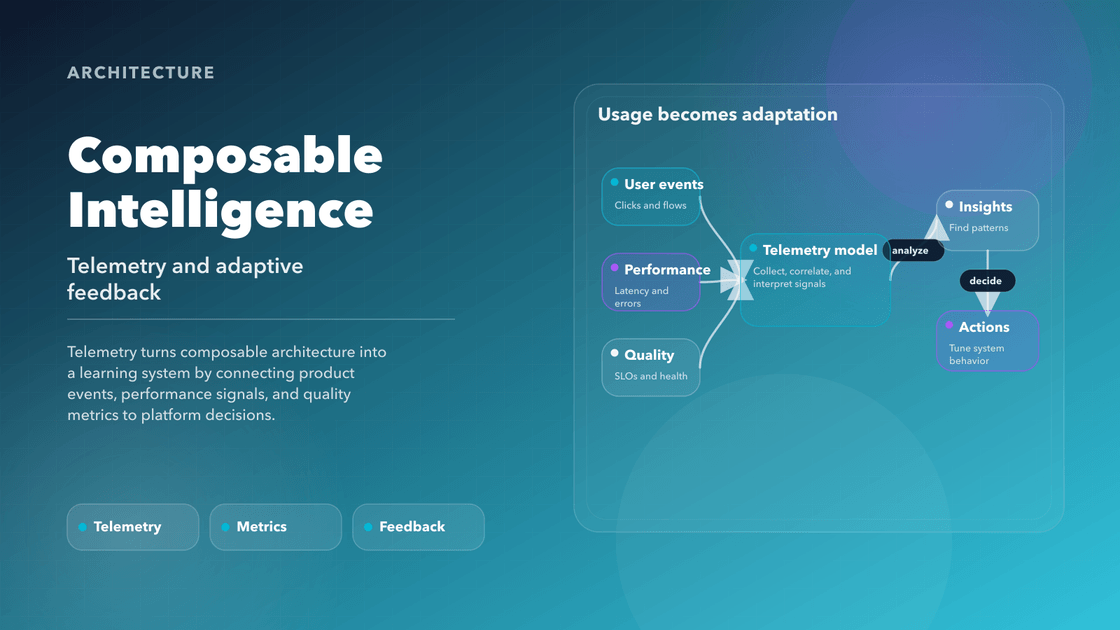
Composable architecture is only half-finished at the moment of release. After that point, the real question is whether the system can learn. Which components are helping? Which patterns are ignored? Which accessibility regressions are repeating? Which variants are expensive to maintain and barely used?
That is the role of observability in a composable frontend. It turns the interface from a shipped artifact into a system that can be inspected, measured, and improved with intent instead of instinct.
If earlier chapters are about how to structure the frontend, this one is about how to make that structure responsive to reality.
Telemetry-Driven UI Design
Design systems are usually evaluated by how quickly they help teams build. A stronger benchmark is whether they help teams learn. Once a component is in production, the useful questions are no longer just about correctness. They become questions of adoption, drift, performance, accessibility, and user behavior in real conditions.
Telemetry is what makes those questions answerable. It shows which components are actually used, where tokens are being overridden, which interactions fail under specific conditions, and which patterns look elegant in design review but create friction in the field.
What to Track and Why
The goal is not maximum instrumentation. The goal is useful instrumentation. Good telemetry helps a team answer whether a pattern is healthy, whether a contract is drifting, and whether the user experience is getting better or worse as the system evolves.
Component Usage
- Track render counts, import frequency, and variant usage.
- Identify duplication or abandonment to guide refactor efforts.
Token Adoption
- Analyze how tokens are resolved at runtime.
- Detect override patterns that signal inconsistency or design drift.
Props and API Drift
- Log unused, deprecated, or misused props.
- Highlight opportunities to simplify component APIs.
Accessibility Signals
- Track keyboard focus, ARIA violations, and motion settings usage.
- Build a longitudinal view of WCAG conformance at scale.
Behavioral Telemetry
- Capture user interactions (clicks, hovers, form activity).
- Identify UX friction points and incomplete user flows.
From Data to Decisions
Data becomes valuable when it changes a decision. The teams that benefit most from frontend telemetry are not the ones with the prettiest dashboards. They are the ones with habits around the data. They review component health regularly. They treat a11y regressions and token drift as system issues, not isolated team failures. They surface anomalies early enough to correct direction instead of documenting decay after the fact.
Real-World Examples
Real-world implementations of observability rituals show how modern engineering organizations turn insights into evolution—not just optimization. These examples highlight how telemetry and metrics lead to improved design systems, accessibility, and product velocity.
Slack uses runtime analytics to monitor prop misuse, log usage frequency of shared components, and detect deprecated patterns. Their design systems team analyzes component drift across teams and creates internal campaigns to refactor or improve documentation. They recently used these insights to sunset a low-adoption input component and merge its functionality into a more flexible primitive. Reference: Slack Engineering Blog
Atlassian employs usage thresholds to automatically surface stale or low-adoption components in a central dashboard. If usage drops below 5% of all codebases, the platform team is notified and triggers a structured RFC to determine next steps. This data-informed approach prevents bloat and maintains a clean, governed design system. Reference: Atlassian Design System Governance Docs
Adobe logs real-time accessibility events (e.g., keyboard traps, improper ARIA roles) in apps built using React Spectrum. When issues spike, the system links telemetry back to specific component versions. This triggered a recent redesign of their
Tooltipprimitive after discovering accessibility issues were heavily clustered in that usage context. Reference: React Spectrum GitHub DiscussionsSpotify tracks token resolution events and visual diffs across client surfaces. By integrating token usage analytics into their CI/CD, they flagged that over 30% of buttons were using hardcoded radius values rather than design tokens. This insight led to a regression-fixing codemod and a token enforcement rule added to linting pipelines. Reference: Spotify Encore System Blog
These aren't isolated wins—they’re institutional behaviors that turn visibility into velocity. Each company uses telemetry not just to detect issues but to guide evolution.
With telemetry in place, the next challenge is visibility. Insight that lives in logs or ad hoc spreadsheets does not improve the system very much. Teams need shared places where health becomes legible.
Frontend Health Dashboards
A system that emits metrics is only halfway complete. To fully realize the benefits of observability, teams need structured, shared, and actionable visibility—this is where frontend health dashboards come in.
These dashboards serve as a centralized interface for monitoring the status, quality, and behavior of your UI in real time. For example, GitHub's internal engineering teams use custom dashboards that track usage patterns across design tokens, theme variants, and component adoption. These scorecards are surfaced in team retros and OKRs, allowing GitHub to link design system health directly to product delivery velocity and technical debt reduction. By embedding this visibility into everyday decision-making, dashboards at GitHub help reinforce consistency and eliminate blind spots before they grow into regressions. They help teams detect trends, correlate regressions, and prioritize work based on evidence—not gut feel.
Core Dashboard Categories
Component Lifecycle Dashboards
- Show which components are actively used, recently updated, or at risk of deprecation
- Include ownership info, version history, prop usage, and changelog summaries
Design System Compliance Dashboards
- Visualize how well tokens are applied across screens and platforms
- Flag overrides, mismatches, or unapproved patterns (e.g. custom colors or spacing)
Accessibility Compliance Dashboards
- Track a11y issues per component, feature, or release
- Visualize progress toward WCAG targets with pass/fail trends
- Group issues by team or product area for accountability
Performance and Stability Dashboards
- Report on first paint, interactivity, error boundaries, bundle sizes
- Correlate regressions with component changes or user segments
Adoption and Reuse Dashboards
- Measure component reuse across products or teams
- Identify duplicate implementations or missing coverage
Best Practices
- Make them discoverable: Embed dashboards into developer portals, PR templates, or design reviews.
- Keep them real-time: Use CI/CD hooks or client-side logging for fresh data.
- Tie metrics to outcomes: Use dashboards to track OKRs (e.g. 90% design token adoption, 100% a11y coverage).
- Share accountability: Make quality a team metric, not an individual’s job.
“Dashboards aren’t just for tracking bugs. They’re mirrors for the system’s health—and its values.”
Well-instrumented dashboards help teams shift from reactive bug fixing to proactive experience management.
Adaptive Feedback Loops
Observability becomes truly valuable when it feeds back into product and design decisions. Adaptive feedback loops ensure that what you learn from telemetry and dashboards doesn’t just sit in a report—it fuels change, closes gaps, and elevates user experience.
What Is an Adaptive Feedback Loop?
An adaptive loop connects data to action:
- Observe: Instrument and track behavior.
- Analyze: Identify patterns, outliers, regressions, or unexpected usage.
- Adapt: Trigger design or code improvements, user interface tweaks, or documentation updates.
- Validate: Measure post-change impact to confirm improvements.
This cyclical process turns the frontend into a living system that learns continuously. For example, consider a company like Airbnb: after observing a recurring pattern of users abandoning a pricing calculator interface midway through, telemetry highlighted that users were confused by the ambiguous labels and unclear step indicators. This feedback loop triggered a design sprint, resulting in clearer visual hierarchy and progressive disclosure. After deployment, abandonment rates dropped by 23%, validating the effectiveness of the change. This kind of data-to-action loop not only improved UX, but also shaped future design principles for similar components across the platform.
Types of Adaptive Feedback
A11y Regression Detection → Automated Fix Proposals
- Component fails WCAG? Suggest a patch or revert.
Performance Drop → Token/Asset Re-optimization
- Large bundle? Flag images, unused tokens, or heavy JS utilities.
Low Component Adoption → Design System Refinement
- A component exists but isn’t reused? Possibly too complex or poorly documented.
User Behavior Patterns → UI Personalization
- Detect repeated input clearing or form abandonment → suggest inline help or adjusted UX.
Where the Feedback Loops Connect
- CI/CD Pipelines: Trigger alerts, fail builds, or annotate PRs.
- Design System Governance: Feed issues into review cadences.
- Developer Experience Teams: Improve scaffolding, CLI tooling, or onboarding docs.
- Design Teams: Refine templates, themes, and interaction flows based on live data.
“A composable system isn’t just modular—it’s responsive. It listens, adapts, and evolves with its users.”
Adaptive feedback loops turn observability from insight into evolution—ensuring your system doesn’t just grow, it improves with purpose.
Feedback Culture and Metric-Driven Governance
Successful observability isn't just technical—it's cultural. The most effective composable systems are supported by teams that treat metrics as conversation starters, not judgments. They build habits around visibility, accountability, and improvement. For instance, Microsoft’s Fluent UI team holds weekly “component quality huddles” where designers, developers, and product leads review dashboards tracking a11y compliance, theme adoption, and performance metrics. These rituals not only align engineering and design goals but also ensure that quality conversations happen regularly and proactively—not just after something breaks.
Core Principles of Feedback Culture
Transparency Over Blame
- Metrics are shared openly, without punitive framing.
- Dashboards show areas of risk, not targets for blame.
Collective Ownership
- Frontend quality isn’t a QA problem—it’s a team-wide responsibility.
- Component health and token adoption are tracked across teams, not silos.
Governance Through Insight
- RFCs are supported by data (e.g. "90% of teams override this component’s spacing prop").
- Component deprecation is based on usage, churn, and bug reports—not intuition.
Ritualized Review
- Weekly observability syncs to review dashboards and prioritize action
- Monthly retros that include a11y, token compliance, and performance regressions
Tied to Business Outcomes
- Frontend metrics are mapped to customer experience, accessibility KPIs, and design system OKRs
- Component-level insights feed back into product roadmaps and UX investments
“In high-trust teams, metrics aren’t surveillance—they’re signals for support.”
A feedback-driven governance model helps architecture evolve alongside the product, not behind it. It ensures that modularity doesn’t turn into fragmentation—and that every change brings the system closer to intentional excellence.
With observability and culture working together, the composable frontend becomes more than scalable—it becomes intelligent. This intelligence isn’t abstract—it shows up in faster fixes, more inclusive interfaces, and product decisions grounded in user reality. In the chapters ahead, we’ll explore how this intelligence extends beyond the UI—into workflows, developer experience, and ecosystem strategy.
Summary
Observability turns composable systems from static structures into living, learning organisms. With real-time data, telemetry, and intentional feedback loops, teams don’t just build—they evolve.
This chapter demonstrated how:
- Telemetry reveals how components are truly used, not just how they were intended.
- Dashboards make UI health visible and shared, enabling proactive decisions.
- Adaptive feedback loops close the gap between data and design, action and outcome.
- Feedback culture turns governance into a system of trust, not control.
These systems bring full-circle the ideas introduced in Chapters 11 and 12—transforming accessibility, design systems, and governance into intelligent, adaptive platforms. Observability becomes the connective tissue between what we build and how it performs in the world.
📊 Diagram Placeholder: Feedback Loop Architecture → Observe → Analyze → Adapt → Validate
⚠️ Common Pitfall: Over-automating without visibility leads to false confidence. Ensure insights are actionable, owned, and connected to real-world outcomes.
“You can’t improve what you can’t see. But when you see clearly, improvement becomes inevitable.”