Extending Composability to Design Systems, Accessibility Layers, and Governance Frameworks

- Published on
Introduction
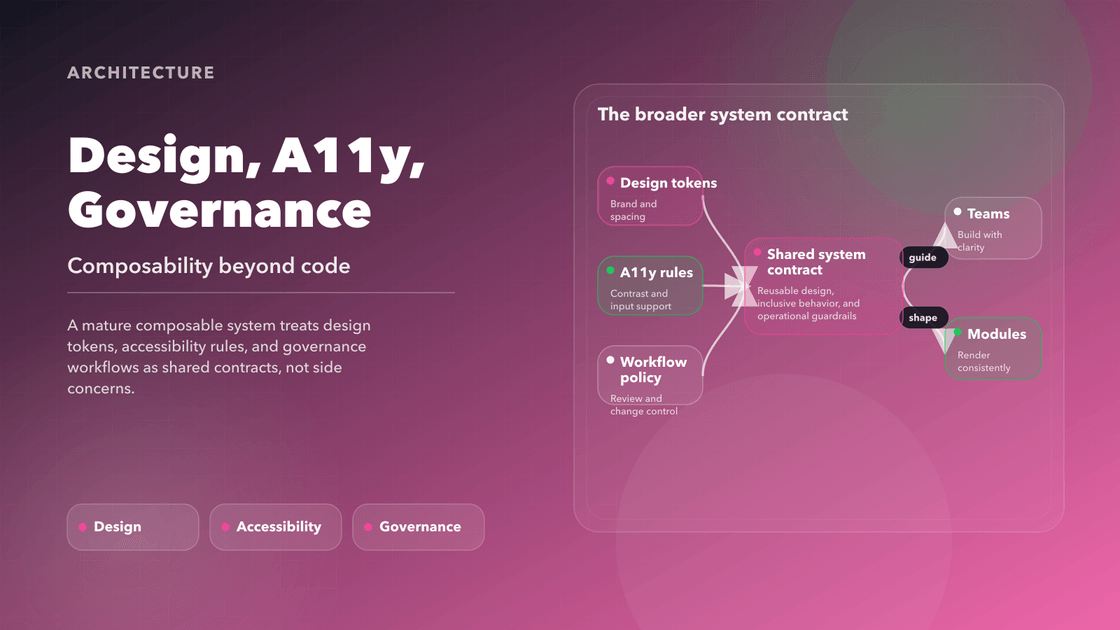
Teams often talk about composability as if it begins and ends with module boundaries, runtime composition, and deployment autonomy. That is only half the story. A composable system also needs shared visual language, built-in accessibility behavior, and rules strong enough to keep teams aligned without turning every change into a negotiation.
That is why this chapter pushes beyond component orchestration. If the design system is soft guidance, if accessibility is something teams “remember later,” or if governance only shows up after a regression, the architecture will still drift. It may be modular in code and chaotic in experience.
The useful benchmark is stricter: a composable system should feel coherent to users, safe to extend for teams, and inclusive by default. Design systems, accessibility, and governance are what make that possible.
Why Design Systems Must Evolve
Design systems used to be treated as documentation plus a component library. That was already incomplete, but it becomes actively dangerous in a composable environment. Once multiple teams can ship into shared surfaces, “follow the Figma” is no longer a serious enforcement model.
A design system has to become executable. Tokens need to resolve consistently. Components need to encode behavior, not just appearance. Documentation needs to expose ownership, variants, accessibility guarantees, and upgrade paths. Most importantly, the platform needs to detect when teams drift away from the contract instead of hoping reviewers catch everything by eye.
That is the shift from design system as reference material to design system as infrastructure. The payoff is practical: less duplication, faster onboarding, safer theming, and less time spent rediscovering the same presentation rules in slightly different codebases.
Design Tokens in a Composable World
Design tokens matter because they are where design decisions become transferable. In a composable system, they are not just named colors and spacing values. They are the mechanism that lets the interface respond to context without forcing every team to invent its own variant strategy.
Static tokens help, but they do not go far enough once runtime conditions start to matter. If density, theme, locale, reduced motion, contrast preferences, or device type change the experience, then the token system needs to resolve those differences deliberately. Otherwise teams fall back to hardcoded exceptions, and the design layer becomes brittle again.
In that sense, tokens behave much more like APIs than style constants. They are contracts that should be versioned, testable, and capable of resolving live context into reliable visual output.
Runtime-Aware Token Resolution
[Platform Context] → [Token Resolver] → [Component Styling]
For example:
- A user who prefers reduced motion triggers a theme with minimal transitions.
- A mobile surface might apply larger touch targets and different padding scales.
- A high-contrast setting overrides brand colors with accessibility-safe options.
The impact of this architecture is enormous:
- Developers no longer hardcode variants—they inherit tokens that react to context.
- Designers don’t worry about enforcement—the system guarantees consistency.
- QA teams spend less time regression testing variants—runtime behavior adapts safely.
🛠 Reference: Salesforce and Adobe have implemented runtime token resolvers that support platform-wide consistency, responsive theming, and WCAG-aligned accessibility by default.
Why This Matters
Without runtime-aware token resolution, every new theme, platform, or accessibility accommodation becomes more expensive than it should be. With it, the system can adapt in one place and distribute the result everywhere. That is the difference between a design layer that scales with the architecture and one that fights it.
Diagram: Platform context feeds a runtime token resolver, which produces adaptive visual output per component.
This is why design tokens matter in a composable world: they allow your interface to speak the language of your system, your users, and your devices—in harmony.
Composability and Accessibility
Accessibility is where many otherwise sophisticated frontend systems reveal how shallow their architecture really is. If accessible behavior only appears when a careful engineer remembers to add it in feature code, the platform is not composable in any meaningful sense. It is merely reusable under ideal conditions.
Composable architecture creates a better opportunity. Because primitives are shared, versioned, and centrally improved, accessibility can be designed into the system instead of bolted onto each feature team’s output. That changes accessibility from a recurring burden into a platform guarantee.
Accessibility in Legacy Systems
- ARIA attributes and semantic roles are inconsistently applied or forgotten
- Focus management is unreliable, leading to broken tab order or keyboard traps
- Visual themes ignore reduced motion or high-contrast preferences
- Assistive technology users receive unpredictable or unusable output
These issues do not stem from bad intentions—they come from missing infrastructure. Developers are forced to re-invent accessibility patterns without support. Designers lack tooling to preview behavior for assistive users. QA teams scramble to catch violations manually.
What Accessible Composability Enables
When accessibility is treated as a runtime and development concern, not a post-launch patch, we unlock a better path forward:
Accessible Primitives
- Base components like
Button,Dialog,Menu, andTooltipare designed with WCAG compliance in mind from the start. - Each includes baked-in roles, keyboard interactions, and screen reader support.
- Teams build on top of these instead of reinventing accessibility logic.
- Base components like
Context-Aware Hooks
- Hooks like
useReducedMotion(),useColorScheme(),useDirectionality()provide contextual input directly from the browser or OS. - These help components adapt without requiring conditionals or overrides at the application level.
- Hooks like
Compliance Contracts and Metadata
- Components publish metadata such as supported WCAG levels, supported input types, and accessibility behaviors.
- This metadata is surfaced in documentation, IDEs, and design systems.
Testing and Enforcement in CI/CD
- Tools like
axe-core,eslint-plugin-jsx-a11y, and Lighthouse are integrated into the pipeline. - Pull requests are blocked if new components introduce regressions.
- Storybook a11y add-ons give instant feedback during development.
- Tools like
Developer Experience with Accessible Components
export const AccessibleButton = (props) => {
  return (
    <button
      role="button"
      aria-disabled={props.disabled}
      aria-label={props.label}
      className={props.theme === 'dark' ? 'btn-dark' : 'btn-light'}
    >
      {props.label}
    </button>
  )
}
This example is minimal, but the component:
- Has proper ARIA roles
- Exposes a label for screen readers
- Applies contextual theming
- Can be extended consistently across apps
The Strategic Value
When accessibility is composable, it becomes scalable:
- New features are accessible by default
- Cross-functional collaboration improves (designers see accessibility states, QA has fewer surprises)
- Legal and compliance teams gain confidence in system-wide guarantees
Accessibility should not be a final test—it should be a first-class capability. The same way we test for performance, integration, or type safety, we must continuously validate accessibility.
Accessible composability transforms accessibility from a blocker into an enabler. It becomes an engine of user trust, inclusion, and technical integrity.
Governance and Workflow Framework
As composable architecture scales, the architectural risks shift. The problem is no longer building components—it's ensuring they coexist with purpose, evolve predictably, and deliver consistent value over time. That is where governance and workflow frameworks step in. Without them, autonomy turns into chaos, and modularity becomes fragmentation.
Think of governance as the nervous system of composable architecture. It doesn't slow down decisions; it routes them to the right places with the right context. It allows systems to scale without compromising quality, alignment, or integrity. In an ecosystem of independently developed components, governance ensures that teams don’t operate in silos or accidentally reinvent the wheel.
Why Governance Matters
Composable systems enable teams to ship faster by decoupling features and UI elements. But with freedom comes complexity. Teams might:
- Use different design tokens or conventions
- Version components inconsistently
- Forget to account for accessibility or localization
- Ship breaking changes unknowingly
All of this erodes user experience and introduces friction for developers. Governance gives us the tools, rules, and rituals to keep that from happening.
Here’s why governance isn’t optional:
- Clear contracts: Without contribution guidelines and ownership boundaries, modules become brittle and hard to maintain.
- Version control and lifecycle: Components must evolve, deprecate, and update without breaking others. Governance enforces semantic versioning and deprecation policies.
- Cross-team alignment: Decisions about design tokens, accessibility requirements, or architectural changes should not happen in isolation.
- Risk mitigation: Security reviews, performance checks, and visual regression must be part of the delivery lifecycle.
Governance provides:
Governance Maturity Model
Organizations often underestimate the evolutionary path toward sustainable governance. Below is a high-level maturity model to benchmark progress:
- Level 1 – Ad Hoc: Components are created with little structure, no enforced accessibility, and no lifecycle policies.
- Level 2 – Emerging: Basic linting, manual documentation, partial token alignment, and some shared components.
- Level 3 – Integrated: Enforced contribution standards, runtime token use, accessibility pipelines, and documented ownership.
- Level 4 – Operationalized: CI/CD automation, cross-team governance board, version-controlled design tokens, and platform-wide observability.
This model helps teams understand where they stand—and where they need to invest next to support sustainable composability.
- Confidence: Developers can consume modules without fear of surprise changes.
- Visibility: Teams know who owns what, what’s stable, what’s deprecated, and what’s in review.
- Consistency: Design, logic, accessibility, and testing standards are shared and enforced.
“Governance is not a bottleneck; it is a safety net. It makes velocity sustainable.”
By implementing a strong governance and workflow strategy, organizations ensure that composable systems remain usable, extensible, and aligned with long-term goals. This is what elevates composability from a development model to a product strategy.
Governance Core Components
A governance framework for composable frontend systems is not a one-size-fits-all solution. It must be tailored to the pace, scale, and cultural needs of your organization. But it always involves a few critical components—each acting as a load-bearing structure in your composable foundation.
Below, we outline the key parts of a working governance model, along with the rationale and practical advice for implementing them.
1. Component Registry
At the heart of any composable system is a registry—a catalog of all components, their current status, owners, dependencies, and usage metrics.
- Purpose: Prevent duplication, improve discoverability, and centralize ownership.
- What to include: Component name, version history, last update, owner, consuming applications, status (e.g., experimental, stable, deprecated).
- Tools: Backstage, Bit, internal portals, or even an advanced Storybook implementation.
A good registry is not just a list. It’s a living source of truth that allows teams to plan, refactor, and scale without fear.
2. Contribution Standards
Every component in your system should follow the same rules of engagement. These contribution guidelines ensure components behave predictably and scale appropriately.
- Design expectations: Follow theming, spacing, and typography rules using runtime tokens.
- Code expectations: Require tests, enforce linting, mandate bundling strategies.
- Accessibility: Must include ARIA roles, keyboard support, and pass axe-core validation.
- Documentation: Usage examples, props tables, and edge case notes.
These policies should be enforced by automated tooling where possible. If something requires human judgment (like a design review), codify when it is required and who approves.
3. Lifecycle Management
Components are not static. They evolve—and that evolution must be managed.
- Lifecycle stages: Proposed → Incubating → Published → Deprecated
- Visibility: Teams must know what they can depend on, and what is subject to change
- Versioning: Semantic versioning (semver) ensures consumers can manage risk
- Migration support: When a component is deprecated, offer migration guides or automated codemods
A good lifecycle policy prevents breakage, reduces tech debt, and builds trust in the system.
4. Review Workflows
Not all components should follow the same review process—but core, shared, and critical path modules should.
- Design Review: Does this align with the design language system?
- Architecture Review: Is the component composable, performant, and extensible?
- Security Review: Any sensitive data handling, permissions, or API interactions?
- Change Approval: RFCs for major decisions, informal signoffs for small ones
Reviews must be predictable. Teams should know what’s expected and how long approvals take. These should be tracked and automated using GitHub Actions, pull request templates, and status checks.
5. CI Validation
Governance without automation doesn’t scale. Every component update should be validated before it reaches production.
- Static Analysis: Linting, TypeScript checks, a11y rules
- Unit Tests: Coverage thresholds per component
- Visual Regression: Snapshot testing via Chromatic or Percy
- Accessibility: axe-core tests and keyboard nav simulation
6. Release Strategy
Your governance model must address how new versions of components are released and rolled out.
- Semantic versioning: Prevents accidental breaking changes
- Canary releases: Deploy new versions to a subset of environments or teams first
- Feature flags: Allow behavior toggling without new deploys
- Changelogs: Standardized and easily consumable
Transparent release processes build trust and reduce integration risk.
7. Governance Board and RFC Process
Finally, governance needs people. A cross-functional group should meet regularly to:
- Review proposals for new components or major refactors
- Approve or reject RFCs (Request for Comments)
- Discuss emergent patterns or risks
- Update contribution rules
This board should include engineers, designers, product owners, and accessibility advocates. Their work should be visible, documented, and reproducible.
“When we proposed our new filtering component, the RFC process surfaced critical use cases from other teams. It saved weeks of rework and led to a more inclusive solution.”
Real-World Case Studies
Case Study Comparison Table
| Company | System | Design Tokens | Accessibility Approach | Governance Practices | Key Outcome |
|---|---|---|---|---|---|
| Adobe | React Spectrum | Runtime-resolved | Built-in into all components | Shared monorepo, CI a11y gates | 30+ apps standardized, 30% fewer bugs |
| Microsoft | Fluent UI | Adaptive per platform | A11y tooling integrated in CI | Token board, platform adapters | 40% a11y bug drop, faster UI rollout |
| IBM | Carbon Design | Cross-platform tokens | Mandatory CI, semantic HTML | RFCs, dashboards, enforced usage | 60% QA effort saved, legal confidence |
Adobe Spectrum
Background and Context: Adobe’s product ecosystem is vast and diverse, spanning desktop tools like Photoshop and Illustrator, web platforms like Adobe Express, and mobile-first experiences such as Creative Cloud apps. Each product evolved independently over time, resulting in inconsistent visual styles, accessibility approaches, and a fragmented user experience. These silos became particularly problematic as Adobe began emphasizing cross-platform synergy and collaboration features.
Challenge: The inconsistencies were not just aesthetic—they affected usability, onboarding, and accessibility. Teams spent redundant effort solving the same problems, and end users often had to re-learn behaviors between products. Worse, accessibility issues were being identified post-release, triggering time-consuming reworks and introducing compliance risks.
Implementation Strategy: Adobe launched the Spectrum Design System to unify UI development. This effort involved not just building components but transforming how design and engineering worked together:
- Conducted a multi-month audit of visual and accessibility issues across major Adobe products
- Built Spectrum as both a design language (Figma kits, usage guidelines) and an executable framework
- Developed React Spectrum, a set of highly accessible, theme-aware components with built-in support for keyboard navigation, screen readers, and reduced motion preferences
- Created Spectrum Tokens, a runtime-resolved token system that adapts to user preferences, device constraints, and platform conventions
- CI pipelines were integrated with accessibility tests (
axe-core), visual regression snapshots (Chromatic), and WCAG 2.1 audits
Cultural and Process Shifts:
- Components were owned in a shared GitHub monorepo
- Design and engineering teams operated as a single spectrum-core team
- Weekly review sessions were instituted to align accessibility enforcement with product priorities
Outcomes and Measurable Impact:
- More than 30 Adobe applications now use React Spectrum
- Product velocity improved due to reduced design drift and component reuse
- Bug reports related to theming or accessibility dropped by over 30%
Learnings and Takeaways:
- Treating accessibility as a default behavior—not a bolt-on—builds long-term efficiency
- Runtime tokens allowed seamless adaptation to dark mode, motion sensitivity, and internationalization
- Having a dedicated a11y + design system review loop within CI ensured changes didn’t slip through
References:
- Devon Govett, “Introducing React Spectrum” Adobe Developer Blog
- React Spectrum GitHub
- Adobe Spectrum Design Guidelines
Microsoft Fluent UI
Background and Context: Microsoft is responsible for one of the largest, most diverse product ecosystems in the world. With core tools like Outlook, Word, Excel, PowerPoint, and Teams operating across platforms (Windows, macOS, iOS, Android, Web, Electron, and Win32), the need for visual consistency, accessibility, and system-wide interoperability became non-negotiable. Each team was solving similar problems—designing input fields, managing keyboard navigation, implementing dark mode—often in different ways.
Challenge: Despite having internal style guidelines, Microsoft struggled with consistent implementation across platforms and teams. New features were built in isolation. Accessibility was handled manually, and design updates took months to propagate across the suite. There was no central enforcement of component contracts, accessibility compliance, or token usage. Design and engineering debt mounted as the company grew and shifted toward cross-product integration.
Implementation Strategy: To address these challenges, Microsoft launched Fluent UI, a comprehensive cross-platform design system rooted in composability, accessibility, and adaptability. The goal was to reduce fragmentation, align product design, and establish a shared foundation across all Microsoft 365 and Azure products.
Key strategic decisions included:
- Creating adaptive design tokens that could dynamically resolve based on platform, theme (light/dark/high contrast), and user preferences
- Engineering core components with built-in ARIA roles, keyboard interactions, and support for screen readers
- Abstracting common interaction logic into reusable primitives
- Building adapters for platform-specific implementations (React, React Native, Win32, Fluent Design for iOS/Android)
Process and Tooling Enhancements:
- GitHub workflows were configured to block merges on failed accessibility tests using
eslint-plugin-jsx-a11y,axe-core, and custom a11y linters - Fluent components were documented with rich Storybook stories, showing accessibility behaviors and test cases in context
- An internal dashboard was created to track a11y compliance, visual diffs, usage analytics, and stale component ownership
- A centralized governance board was established to manage token evolution, component updates, and contribution approvals
Cultural Impact:
- Product teams no longer needed to interpret guidelines—they consumed the same runtime tokens and shared components
- Design and engineering developed a tighter feedback loop via weekly audits and component office hours
- Fluent UI became the foundation of onboarding documentation for new hires building UI
Outcomes and Measurable Impact:
- Fluent UI is now adopted across all core Microsoft 365 products
- A11y bugs and theming inconsistencies decreased by over 40% in the first year of adoption
- Time-to-market for new shared UI patterns dropped significantly
- Internal satisfaction scores (via DevX surveys) improved as a result of better documentation, enforced contracts, and code sharing
Learnings and Takeaways:
- Accessibility must be owned at the system level—not by each feature team
- Runtime token adaptability is key to delivering experiences that feel native on any platform
- Organizational buy-in is critical: governance rituals, dashboards, and feedback loops drive trust in the system
References:
IBM Carbon Design System
Background and Context: IBM supports a complex ecosystem of enterprise applications that span across cloud computing, AI, analytics, blockchain, cybersecurity, and industry-specific platforms. These applications serve both internal teams and external enterprise clients, meaning that accessibility and design consistency were not just matters of quality—they were contractual obligations.
As IBM's product teams operated independently, they made their own UI decisions. The result was divergent design approaches, inconsistent user experiences, and accessibility gaps that affected compliance with global standards like WCAG and Section 508. The company faced repeated inefficiencies: visual QA cycles were long, manual a11y testing added overhead, and each product team maintained its own style system.
Challenge: The scattered nature of design systems meant each new product duplicated UI and accessibility logic. Ensuring that all products met accessibility compliance became nearly impossible. Fragmentation led to:
- Design drift and brand inconsistency
- Delayed release cycles due to last-minute a11y fixes
- Increased cost of maintaining components across tech stacks (React, Angular, native mobile)
Implementation Strategy: IBM established the Carbon Design System to unify design and development across its global product line. The vision was to treat accessibility and design cohesion as first-class infrastructure.
- Built Carbon with a foundation of semantic HTML, keyboard-accessible components, and ARIA attributes
- Published design tokens and style utilities consumable by Sass, JS, iOS, and Android platforms
- Created platform-agnostic core primitives (buttons, tables, modals) that could be extended but not rewritten
- Instituted a component versioning and lifecycle policy across product teams
Tooling and Workflow Improvements:
- Pull requests ran automated
axe-core,Lighthouse, andeslint-plugin-jsx-a11ychecks - All visual changes were subjected to Percy visual regression testing
- Component changes required WCAG checklist validation and visual theme QA (dark mode, high contrast, RTL)
- Accessibility reports were shared across teams via GitHub Projects and Jira
Cultural Enablement and Governance:
- Required onboarding courses for accessibility and inclusive design
- Created usage dashboards to track which components were most used and where gaps existed
- Embedded a11y and design system reviewers into each product squad
Outcomes and Business Impact:
- 60% reduction in manual QA efforts for accessibility within the first year
- Faster time to first UI commit for new projects due to available primitives
- Carbon became the official framework for all IBM Cloud and AI products
- Products achieved WCAG 2.1 AA compliance as a baseline, removing legal friction in client delivery
Learnings and Takeaways:
- Scaling accessibility requires not just documentation but active enforcement in pipelines
- Design systems must serve the broadest set of platforms possible to truly reduce fragmentation
- Empowering teams with tested, accessible primitives increases velocity without compromising quality
References:
- Carbon Design System
- Carbon GitHub
- IBM Accessibility at Scale (internal whitepaper, summarized in various IBM developer talks)
Summary
This chapter establishes that composable architecture is not simply about decomposing user interfaces into components. It's about creating a cohesive ecosystem where design systems, accessibility, and governance are treated as operational and architectural building blocks—each one essential for scale, speed, and sustainability.
In traditional development, these concerns are often siloed or bolted on late in the process. But in a composable system, they must be embedded from the start:
- Design systems evolve into runtime infrastructure, enabling consistency across platforms and devices.
- Accessibility becomes a system-level guarantee, not a patchwork of developer effort.
- Governance ensures that as systems scale, they do so predictably, securely, and in alignment with organizational goals.
By integrating these layers into the composable framework, we unlock faster development cycles, higher product quality, and broader user reach. Teams become more autonomous without losing cohesion. Platforms become more adaptive without becoming fragile.
Why This Is Valuable
- ✅ Establishes shared infrastructure for scalable UI systems
- ✅ Shifts accessibility from a compliance burden to a capability
- ✅ Reduces technical and design debt through reusable governance contracts
- ✅ Builds systems where autonomy and alignment coexist
🔢 Composability isn’t just about code reuse. It’s about systemic reuse of trust, quality, and inclusion.
Next Steps for Architects
- Audit your design system – Identify where design tokens are missing or inconsistently applied across products.
- Automate accessibility checks – Integrate tools like
axe-coreand Lighthouse into your CI/CD pipelines. - Create a governance board – Include designers, engineers, and product leads to oversee component lifecycle.
- Adopt runtime tokens – Refactor legacy components to leverage contextual token resolution.
- Establish a component registry – Make all components discoverable, versioned, and traceable.
🔜 Next: Chapter 12 – Automation, Orchestration, and Platform Thinking